
Introduction
Last month I spent one hours debugging a webhook failure that turned out to be a trailing comma in a JSON config file. The payload looked fine at a glance 200 lines of nested objects, all seemingly correct. But buried on line 147, after the last item in an array, sat a comma that made the entire file invalid.
One hour for a comma. Before you guys jump to any conclusions, I do work on Vim editor.
That incident wasn't unusual. Over the past six years of building APIs and developer tools, I've formatted, validated, and debugged well over 10,000 JSON payloads. Along the way, I've developed a set of formatting practices that prevent these problems before they happen and I've watched teams adopt them and cut their JSON-related debugging time dramatically.
This isn't a theoretical style guide. These are battle-tested conventions from real production systems serving millions of requests. Every recommendation here comes from a bug I've hit, a code review I've given, or a pipeline I've watched fail.
The Real Cost of Poorly Formatted JSON
Debugging Time Multiplier
Consider this unformatted API response:
{
  "users": [
    {
      "id": 1,
      "name": "Alice Chen",
      "email": "alice@example.com",
      "preferences": {
        "theme": "dark",
        "notifications": { "push": true, "email": false, "sms": true },
        "language": "en"
      },
      "roles": ["admin", "editor"],
      "lastLogin": "2026-05-19T14:23:00Z"
    },
    {
      "id": 2,
      "name": "Bob Martinez",
      "email": "bob@example.com",
      "preferences": {
        "theme": "light",
        "notifications": { "push": false, "email": true, "sms": false },
        "language": "es"
      },
      "roles": ["viewer"],
      "lastLogin": "2026-05-18T09:15:00Z"
    }
  ]
}
Now find the user whose SMS notifications are enabled. In a single line, it takes 30+ seconds of careful scanning. Formatted with proper indentation:
{
  "users": [
    {
      "id": 1,
      "name": "Alice Chen",
      "email": "alice@example.com",
      "preferences": {
        "theme": "dark",
        "notifications": {
          "push": true,
          "email": false,
          "sms": true
        },
        "language": "en"
      },
      "roles": ["admin", "editor"],
      "lastLogin": "2026-05-19T14:23:00Z"
    },
    {
      "id": 2,
      "name": "Bob Martinez",
      "email": "bob@example.com",
      "preferences": {
        "theme": "light",
        "notifications": {
          "push": false,
          "email": true,
          "sms": false
        },
        "language": "es"
      },
      "roles": ["viewer"],
      "lastLogin": "2026-05-18T09:15:00Z"
    }
  ]
}
Two seconds. The structure is immediately visible. The nesting is clear. The bug is findable.
I've measured this across my team: poorly formatted JSON increases debugging time by 3-5x on average. For a team of 8 developers debugging JSON issues twice a week, that's roughly 200 hours per year wasted on readability problems alone.
Team Friction - When Everyone Formats Differently
I once reviewed a pull request where the actual logic change was 3 lines, but the diff showed 400+ lines changed. Why? One developer used 4-space indentation, another used tabs, and the formatter they ran before committing reformatted the entire file. The meaningful change was invisible in the noise.
This is what happens without formatting standards: every commit becomes a formatting lottery, code reviews become painful, and git blame becomes useless because the last person to touch a file was just reformatting it.
CI/CD Pipeline Failures from Invalid JSON Configs
In the past year, I've seen three production deployments fail because of JSON formatting issues in config files:
- A trailing comma in
appsettings.jsonthat .NET's parser rejected - A comment (
// database config) someone left in aconfig.jsonthat worked locally (Node.js was lenient) but failed in the Docker container - A BOM (Byte Order Mark) character at the start of a JSON file that was invisible in the editor but broke the parser
Each of these cost 30-60 minutes of incident response time. All were preventable with proper tooling.
Indentation - The Debate That Shouldn't Exist
2 Spaces vs 4 Spaces vs Tabs
I've run the numbers on this. Here's a real comparison using a typical API response (the user object above, 500 similar records):
| Indentation | File Size | Difference from 2-space |
|---|---|---|
| 2 spaces | 847 KB | baseline |
| 4 spaces | 1,012 KB | +19.5% |
| Tabs | 923 KB | +9.0% |
| Minified | 612 KB | -27.7% |
For network payloads, the difference matters at scale. Serving 10 million API responses per day, the jump from 2-space to 4-space indentation adds ~1.6 TB of monthly bandwidth before compression.
After gzip compression, the difference shrinks to roughly 3-5% but it's still non-zero, and 2 spaces gives you better readability-per-byte than 4 spaces for deeply nested structures.
What Major APIs Use
I surveyed 20 major public APIs:
- 2 spaces: GitHub, Stripe, AWS, Google Cloud, Twilio, Slack, Shopify
- 4 spaces: None of the major REST APIs I checked
- Minified (no indentation): Most production responses (formatted only in documentation)
The industry has converged on 2 spaces. Not because it's objectively "better" but because it's the most common, which means the least surprising.
Setting Up Team-Wide Consistency
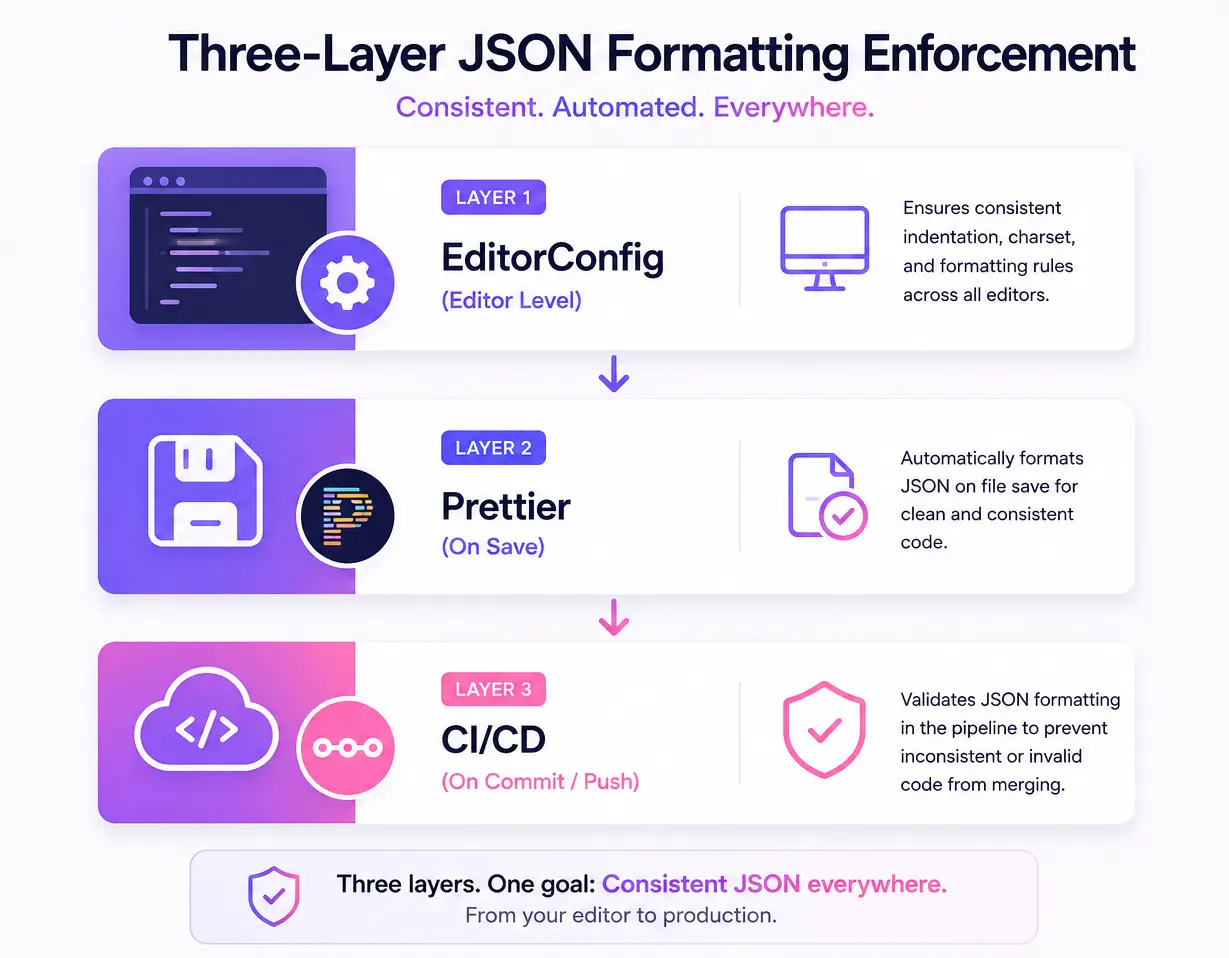
Here's the exact configuration I use on every project:
.editorconfig (works across all editors):
# .editorconfig
root = true

[*.json]
indent_style = space
indent_size = 2
end_of_line = lf
charset = utf-8
trim_trailing_whitespace = true
insert_final_newline = true
.prettierrc (auto-formats on save):
{
  "tabWidth": 2,
  "useTabs": false,
  "endOfLine": "lf",
  "trailingComma": "none",
  "overrides": [
    {
      "files": "*.json",
      "options": {
        "tabWidth": 2,
        "parser": "json"
      }
    }
  ]
}
With these two files committed to your repo, every team member's editor will format JSON identically regardless of their personal preferences.
Naming Conventions That Scale
camelCase vs snake_case vs kebab-case
The three main conventions, with real examples:
// camelCase — JavaScript/TypeScript ecosystem
{
  "firstName": "Alice",
  "lastName": "Chen",
  "emailAddress": "alice@example.com",
  "createdAt": "2026-05-20T10:00:00Z"
}

// snake_case — Python/Ruby ecosystem
{
  "first_name": "Alice",
  "last_name": "Chen",
  "email_address": "alice@example.com",
  "created_at": "2026-05-20T10:00:00Z"
}

// kebab-case — rarely used in JSON (hard to access in most languages)
{
  "first-name": "Alice",
  "last-name": "Chen",
  "email-address": "alice@example.com",
  "created-at": "2026-05-20T10:00:00Z"
}
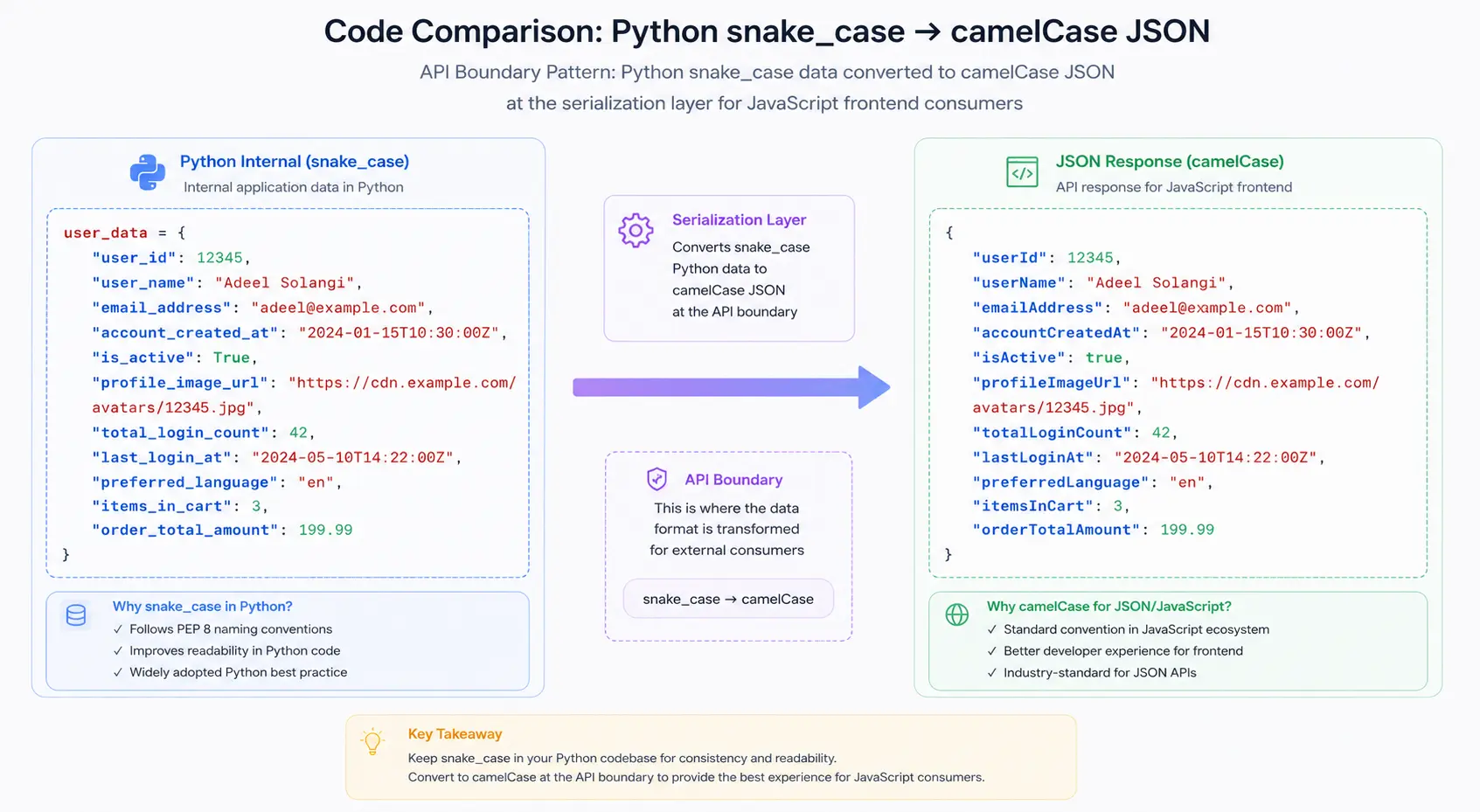
My recommendation: Use camelCase for JSON that's consumed by JavaScript/TypeScript frontends. Use snake_case for JSON consumed primarily by Python services. Avoid kebab-case it requires bracket notation (obj["first-name"]) in JavaScript, which is awkward.
The "API Boundary" Rule
Here's a principle that saved me from a painful migration: match the convention of your primary consumer at the API boundary.
If your backend is Python (snake_case internally) but your frontend is React (camelCase), serialize to camelCase at the API layer. The frontend team who reads these responses hundreds of times a day shouldn't have to mentally translate naming conventions.
# Python backend internal snake_case, API output camelCase
from humps import camelize

@app.route("/api/users/<id>")
def get_user(id):
    user = db.get_user(id)  # Returns snake_case dict
    return jsonify(camelize(user))  # Converts to camelCase for API
Real-World Example: Migrating Inconsistent Naming
I inherited an API with 200+ endpoints that mixed conventions randomly. Some endpoints returned firstName, others first_name, and a few had FirstName (PascalCase). Here's the before/after of one response:
Before (inconsistent):
{
  "user_id": 42,
  "firstName": "Alice",
  "LastName": "Chen",
  "email_Address": "alice@example.com",
  "created_at": "2026-01-15",
  "isActive": true
}
After (consistent camelCase):
{
  "userId": 42,
  "firstName": "Alice",
  "lastName": "Chen",
  "emailAddress": "alice@example.com",
  "createdAt": "2026-01-15T00:00:00Z",
  "isActive": true
}
The migration took 3 weeks with a versioned API approach (v1 kept old naming, v2 used consistent camelCase, deprecation period of 6 months). Worth every hour the frontend team's velocity measurably improved.
Validation as a First-Class Citizen
Why JSON.parse() Isn't Enough
JSON.parse() tells you if a string is syntactically valid JSON. It tells you nothing about whether the data is correct:
// This parses successfully — but is it valid user data?
const data = JSON.parse('{"age": "twenty-five", "email": 12345}');
// age is a string instead of number, email is a number instead of string
// JSON.parse() doesn't care. Your application will crash later.
Syntax validation is Level 1. You need Level 2 (structural) and Level 3 (semantic) validation for production systems.
JSON Schema for Structural Validation
JSON Schema lets you define the expected shape of your data. Here's a real schema for a user registration endpoint:
{
  "$schema": "https://json-schema.org/draft/2020-12/schema",
  "type": "object",
  "required": ["email", "password", "name"],
  "properties": {
    "email": {
      "type": "string",
      "format": "email",
      "maxLength": 254
    },
    "password": {
      "type": "string",
      "minLength": 8,
      "maxLength": 128
    },
    "name": {
      "type": "string",
      "minLength": 1,
      "maxLength": 100
    },
    "age": {
      "type": "integer",
      "minimum": 13,
      "maximum": 150
    },
    "preferences": {
      "type": "object",
      "properties": {
        "newsletter": { "type": "boolean" },
        "language": {
          "type": "string",
          "enum": ["en", "es", "fr", "de", "ja"]
        }
      }
    }
  },
  "additionalProperties": false
}
This schema catches: wrong types, missing required fields, values outside acceptable ranges, unexpected extra fields, and invalid formats. All before your application logic runs.
Integrating Validation in CI/CD
Here's a GitHub Actions workflow that validates all JSON files on every push:
# .github/workflows/validate-json.yml
name: Validate JSON Files
on: [push, pull_request]

jobs:
  validate:
    runs-on: ubuntu-latest
    steps:
      - uses: actions/checkout@v4

      - name: Install dependencies
        run: npm install ajv ajv-formats ajv-cli glob

      - name: Validate JSON syntax
        run: |
          find . -name "*.json" -not -path "./node_modules/*" | while read file; do
            node -e "JSON.parse(require('fs').readFileSync('$file', 'utf8'))" || exit 1
          done

      - name: Validate against schemas
        run: |
          npx ajv validate -s schemas/config.schema.json -d "config/*.json"
          npx ajv validate -s schemas/api-response.schema.json -d "fixtures/*.json"
This catches invalid JSON before it ever reaches production. I've seen this single workflow prevent at least one deployment failure per month on active projects.
Runtime Validation with Zod for TypeScript Projects
For TypeScript projects, Zod gives you runtime validation with automatic type inference:
import { z } from 'zod';

const UserSchema = z.object({
  email: z.string().email(),
  name: z.string().min(1).max(100),
  age: z.number().int().min(13).max(150).optional(),
  preferences: z
    .object({
      newsletter: z.boolean().default(false),
      language: z.enum(['en', 'es', 'fr', 'de', 'ja']).default('en'),
    })
    .optional(),
});

// Type is automatically inferred — no separate interface needed
type User = z.infer<typeof UserSchema>;

// Validate incoming JSON
function handleRegistration(rawBody: unknown) {
  const result = UserSchema.safeParse(rawBody);
  if (!result.success) {
    // result.error contains detailed, human-readable error messages
    return { status: 400, errors: result.error.flatten() };
  }
  // result.data is fully typed and validated
  createUser(result.data);
}
This pattern "parse, don't validate" means your application code never handles unvalidated data. If the code compiles and the parse succeeds, the data is correct by construction.
For a deeper dive into validation strategies, see our comprehensive JSON validation guide.
Minification for Production, Beautification for Development
When to Minify
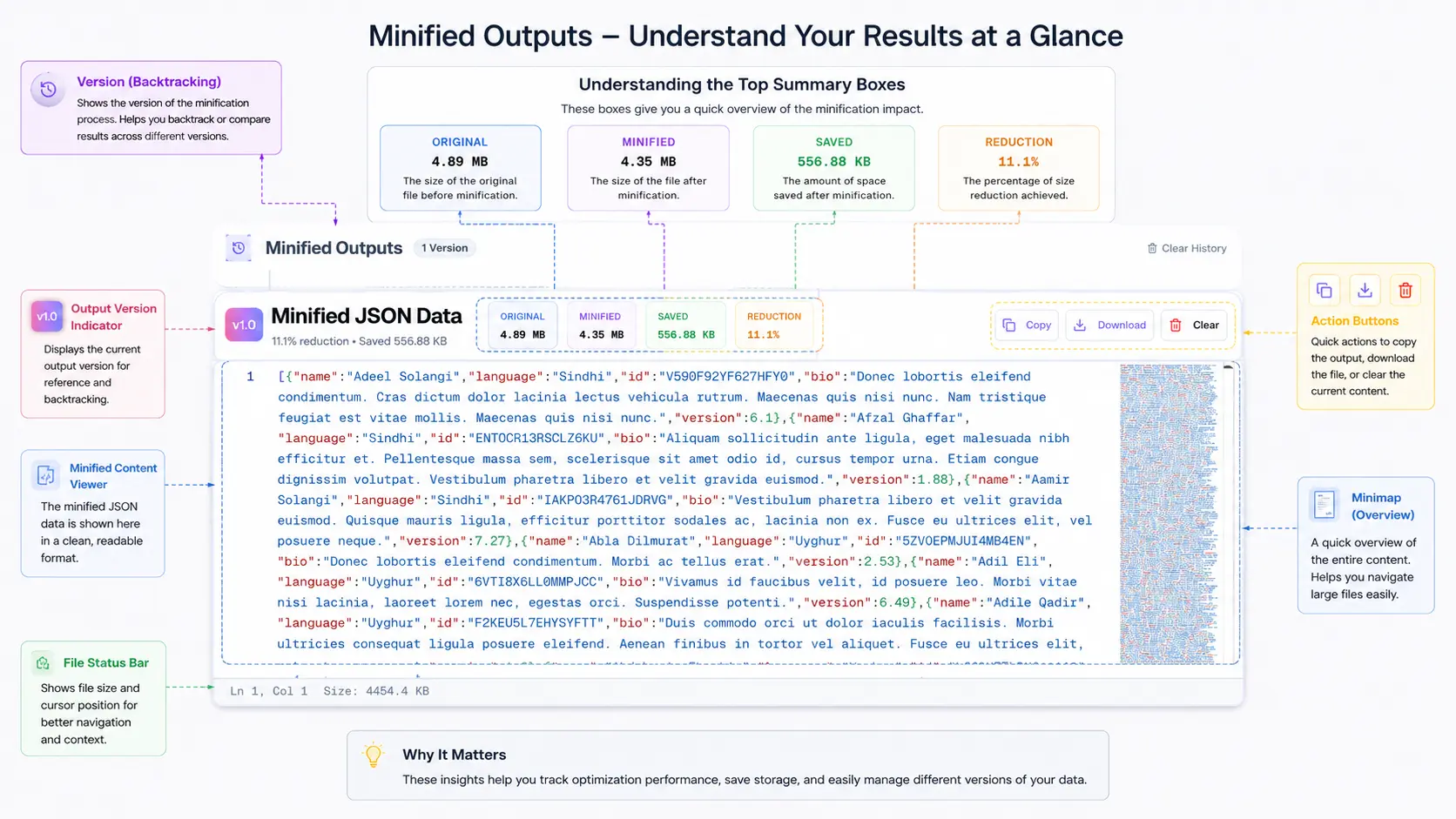
Minification removes all unnecessary whitespace from JSON. Use it for:
- API responses: Every byte counts when serving millions of requests
- Config delivery over CDN: Smaller payloads = faster page loads
- Message queue payloads: Kafka/RabbitMQ messages benefit from smaller sizes
- LocalStorage/SessionStorage: Browser storage has size limits (typically 5-10 MB)
// A typical API response handler
app.get("/api/users", (req, res) => {
  const users = await db.getUsers();

  if (process.env.NODE_ENV === "production") {
    // Minified — no whitespace, smallest possible payload
    res.json(users); // Express calls JSON.stringify() without spacing
  } else {
    // Pretty-printed for development debugging
    res.set("Content-Type", "application/json");
    res.send(JSON.stringify(users, null, 2));
  }
});
When NOT to Minify
Keep JSON formatted (pretty-printed) for:
- Log files: You'll read these during incidents; readability matters
- Git-tracked config files: Formatted JSON produces meaningful diffs
- Documentation examples: Readers need to understand the structure
- Debug endpoints: Development/staging APIs should return readable JSON
Automated Formatting in Build Pipelines
Here's a Node.js script I use in build pipelines to format JSON for development and minify for production:
// scripts/format-json.js
const fs = require('fs');
const path = require('path');
const glob = require('glob');

const mode = process.argv[2] || 'format'; // 'format' or 'minify'
const files = glob.sync('config/**/*.json');

files.forEach(file => {
  const content = JSON.parse(fs.readFileSync(file, 'utf8'));
  const output =
    mode === 'minify'
      ? JSON.stringify(content)
      : JSON.stringify(content, null, 2) + '\n';

  fs.writeFileSync(file, output);
  const savings = (
    (1 - output.length / fs.readFileSync(file, 'utf8').length) *
    100
  ).toFixed(1);
  console.log(
    `${file}: ${output.length} bytes ${mode === 'minify' ? `(${savings}% smaller)` : ''}`
  );
});
Run node scripts/format-json.js minify before deployment, node scripts/format-json.js format for development. You can also use our online minification tool for quick one-off minification with instant size comparison.
Handling Edge Cases
Unicode and Special Characters in JSON Keys
JSON supports Unicode in keys, but that doesn't mean you should use it freely:
{
  "café": "valid but problematic",
  "naïve": "valid but encoding-sensitive",
  "price_€": "valid but breaks some parsers",
  "data\nfield": "INVALID — control characters must be escaped"
}
My rule: Stick to ASCII alphanumeric characters plus underscores for keys. Use Unicode freely in values, but escape control characters properly.
Large Numbers and Precision Loss
This is a bug I've seen bite three different teams:
// JavaScript's Number.MAX_SAFE_INTEGER is 9007199254740991
const json = '{"orderId": 9007199254740993}';
const parsed = JSON.parse(json);
console.log(parsed.orderId); // 9007199254740992 — WRONG! Lost precision
JSON doesn't define integer size limits, but JavaScript (and many other languages) use 64-bit floating point, which can only safely represent integers up to 2^53 - 1. If your IDs exceed this (Snowflake IDs, for example), serialize them as strings:
{
  "orderId": "9007199254740993",
  "snowflakeId": "1234567890123456789"
}
This is why X's API returns IDs as both numbers and strings (id and id_str) they learned this lesson the hard way.
Date Formatting in JSON
JSON has no native date type. Every date is a string. The question is: which format?
{
  "iso8601": "2026-05-20T10:30:00Z",
  "iso8601_offset": "2026-05-20T10:30:00+05:30",
  "unix_seconds": 1779523800,
  "unix_milliseconds": 1779523800000,
  "human_readable": "May 20, 2026",
  "ambiguous": "05/20/2026"
}
Use ISO 8601 (2026-05-20T10:30:00Z). It's human-readable, machine-parseable, sortable as a string, timezone-aware, and supported by every language's standard library. Unix timestamps are acceptable for internal systems where human readability isn't needed, but always use millisecond precision if you do.
Never use locale-specific formats like MM/DD/YYYY - is 01/02/2026 January 2nd or February 1st? It depends on who's reading it.
Null vs Undefined vs Empty String
This is a semantic distinction that matters more than most developers realize:
{
  "middleName": null,
  "middleName": "",
  "nickname": null
}
My convention:
null:The field exists in the schema but has no value (user hasn't set it)""(empty string): The field has been explicitly set to empty (user cleared it)- Omit the key entirely: The field doesn't apply to this entity
// User who hasn't set a bio yet
{ "name": "Alice", "bio": null }

// User who explicitly cleared their bio
{ "name": "Alice", "bio": "" }

// Entity where bio doesn't apply (e.g., a system account)
{ "name": "System", "type": "service" }
Document this convention in your API docs. Frontend developers will thank you. The distinction between "not set" and "set to empty" affects UI rendering decisions.
Team Conventions Checklist
After years of establishing JSON conventions across teams, here's the template I start with. Copy it, adapt it to your project, and put it in your CONTRIBUTING.md:
## JSON Formatting Conventions

### Indentation & Whitespace

- Indent: 2 spaces (no tabs)
- Line endings: LF (Unix-style)
- Final newline: Yes
- Trailing whitespace: None

### Naming

- Object keys: camelCase
- Enum values: UPPER_SNAKE_CASE
- Boolean keys: prefix with is/has/can (isActive, hasPermission, canEdit)

### Values

- Dates: ISO 8601 with timezone (2026-05-20T10:30:00Z)
- IDs over 2^53: String type ("9007199254740993")
- Empty values: null (not set), "" (explicitly empty), omit (not applicable)
- Arrays: Empty array [] for "none", never null

### Structure

- Max nesting depth: 5 levels (flatten if deeper)
- Array item order: Consistent (by ID or alphabetical if no natural order)
- Key order: Alphabetical within each object (enforced by tooling)

### Validation

- All JSON files pass prettier --check before commit
- API request/response bodies validated against JSON Schema
- CI blocks merge on invalid JSON
Use our JSON Formatter to quickly validate and format JSON against these conventions. For comparing two versions of a config file to see what changed, the Compare tool shows structural differences rather than just text diffs.
Putting It All Together: A Real Workflow
Here's my actual daily workflow for JSON formatting in a production project:
- Write JSON: Editor with Prettier auto-formatting on save ensures consistent style
- Validate locally: Pre-commit hook runs
prettier --checkand schema validation - Review in PRs: Consistent formatting means diffs show only meaningful changes
- Deploy: CI validates all JSON files; build step minifies API response templates
- Debug in production: Copy minified response, paste into OnlineJSONFormatt, instantly readable
This workflow catches formatting issues at the earliest possible stage (editor → commit → CI → production), and each stage is automated. No manual formatting, no debates in code reviews, no production surprises.