
Introduction
A data engineer on my team Slacked me a .parquet file last month with the message: "Can you quickly check if the user_id column looks right?"
"Quickly." Sure. Let me just fire up a Python environment, activate the virtualenv, pip install pyarrow pandas, write a script, realize I need fastparquet too because the compression codec is different, fix a version conflict with numpy, and - oh wait, it's been 15 minutes and I still haven't seen a single row of data.
This is the Parquet tax. The format is brilliant for analytics - compact, columnar, blazing fast to query. But opening one for a quick peek? That used to feel like needing a forklift to check what's inside a shoebox.
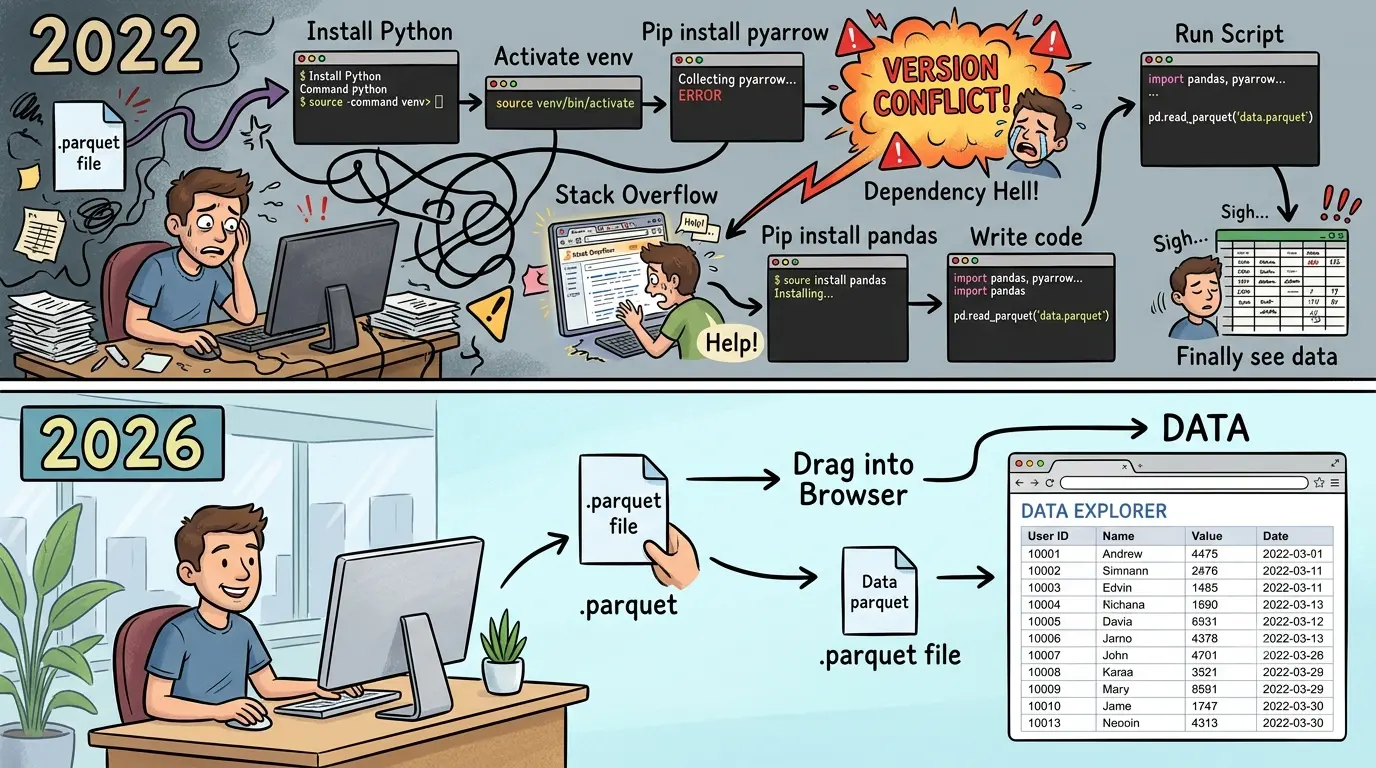
Not anymore. In 2026, you can open Parquet files directly in your browser - no Python, no Spark, no JVM, no Docker containers pretending to be simple. Just drag, drop, data. This guide covers every way to view Parquet files, from the 5-second browser method to the full CLI setup for power users.
What Is a Parquet File? (The 30-Second Version)
Apache Parquet is a columnar binary storage format designed for analytical workloads. Unlike JSON or CSV where data is stored row-by-row, Parquet stores all values of a single column together. This means:
- Queries that touch few columns are extremely fast - reading
SELECT user_id FROM eventsdoesn't need to scan the entire file - Compression is dramatically better - similar values (all integers, all timestamps) compress far more efficiently than mixed-type rows
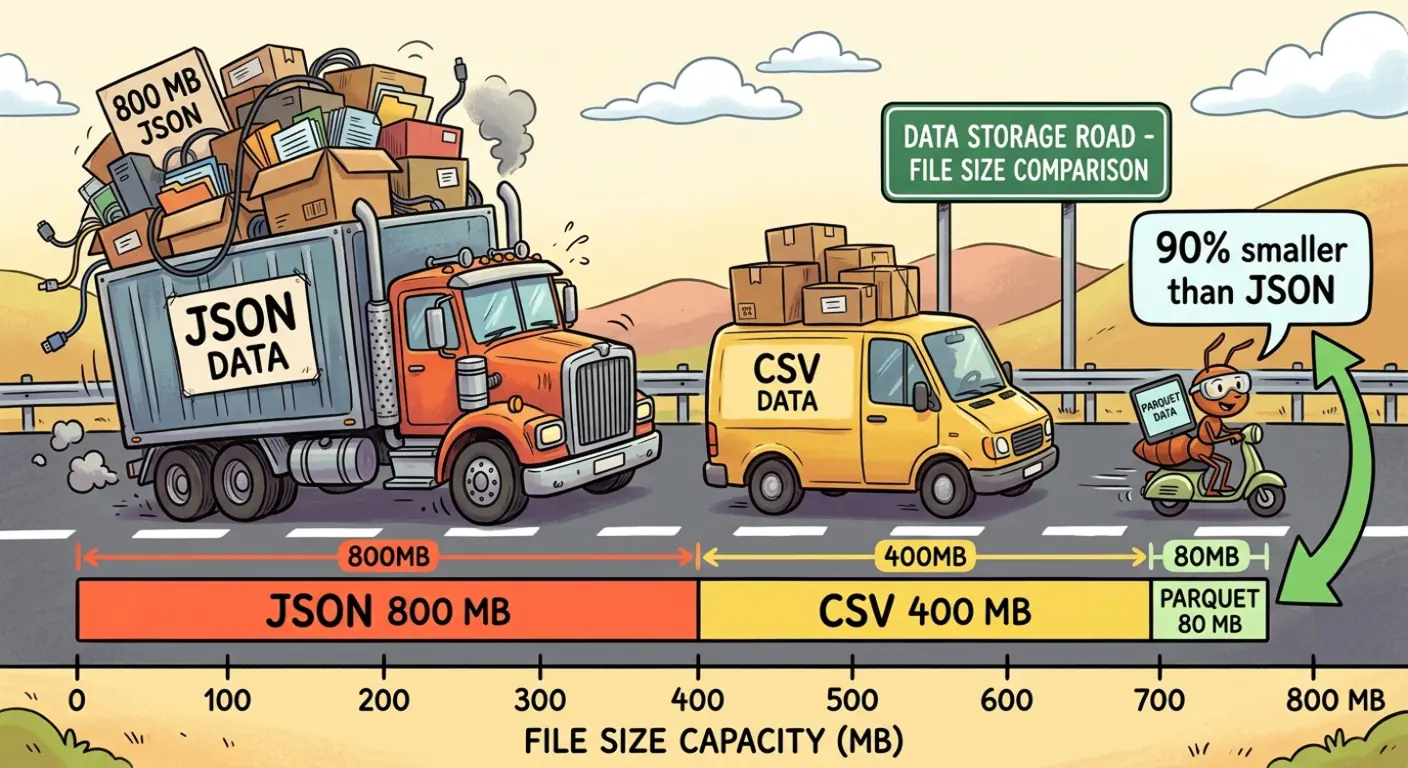
- Files are 5-10x smaller than equivalent JSON, and 3-5x smaller than CSV
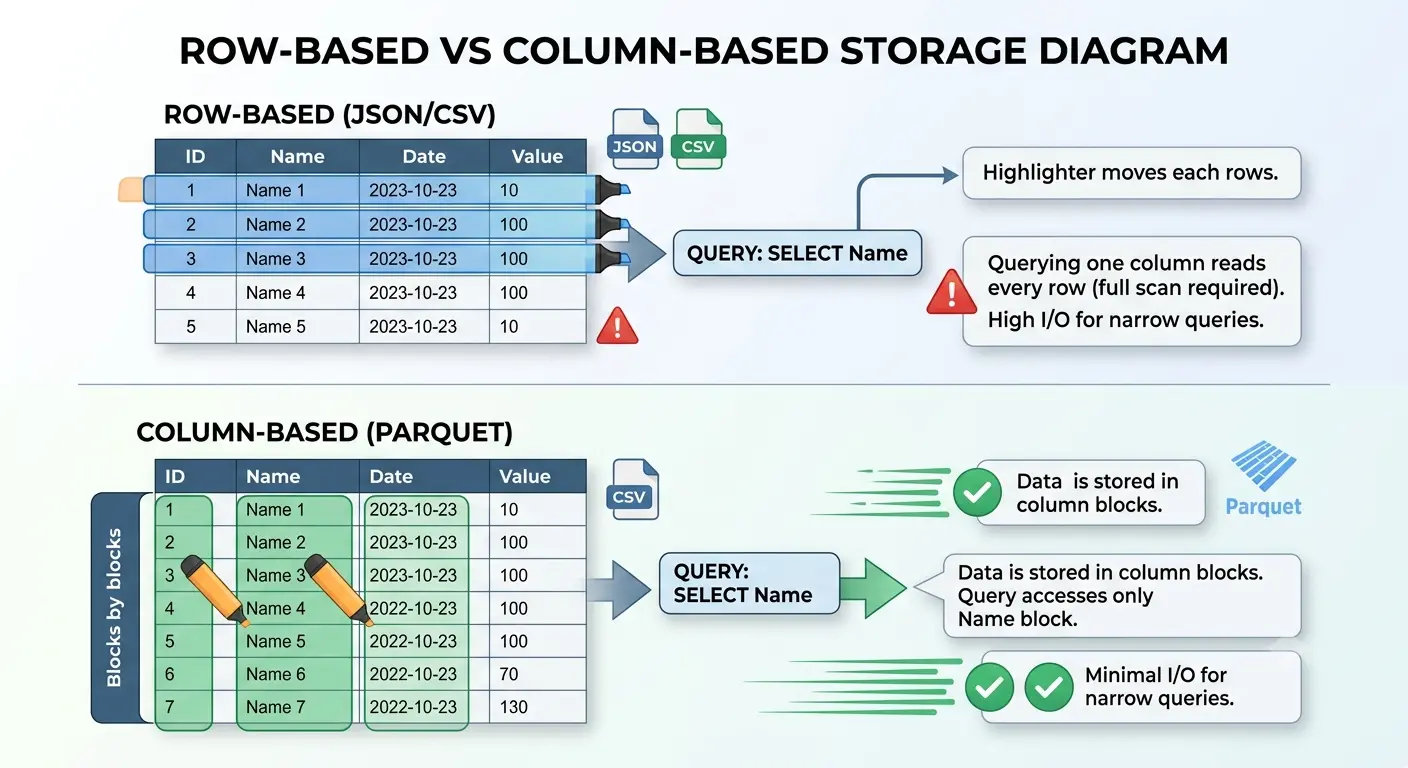
The tradeoff? It's binary. You can't cat a Parquet file and see anything useful. You can't open it in Notepad. You can't even open it in Excel (I've watched people try - it's like watching someone use a screwdriver as a hammer). You need a tool that understands the format.
Here's the thing: that tool doesn't need to be a 4GB Python installation anymore.
The Fastest Way: Open Parquet Files in Your Browser
For 90% of "let me quickly check this data" scenarios, a browser-based viewer is the answer. No install, no setup, no "it works on my machine" debugging.
How It Works (The Nerdy Bit)
Modern browser-based Parquet viewers use WebAssembly (WASM) to run a full query engine inside your browser tab. Specifically, most use DuckDB compiled to WASM - the same analytical database that data engineers use in production, just running in a browser sandbox.
Your file never leaves your machine. There's no upload, no server processing, no "please wait while we process your file on our cloud." The browser reads the bytes directly, parses the Parquet metadata (footer, row groups, column chunks), and renders the data in a table. It's the same technology that powers Google Sheets' offline mode - except instead of spreadsheets, it's parsing columnar binary formats.
Step-by-Step: Viewing a Parquet File Online
- Open our Parquet Viewer
- Drag your
.parquetfile onto the page (or click to browse) - Done. You're looking at your data.
That's it. No step 4. No "configure your environment." No "ensure Java 11+ is on your PATH." You're done.
What you get:
- Schema view - column names, data types, nullable flags
- Data grid - browse rows with sorting and filtering
- SQL queries - write actual SQL against your file (
SELECT * FROM data WHERE age > 25 LIMIT 100) - Export - download as JSON or CSV if you need a different format
I use this probably 3-4 times a week now. Quick data validation, checking column types before writing a pipeline, verifying that an export didn't mangle timestamps. The "I'll just quickly check" actually takes quickly.
When You Need More: Python + PyArrow
Browser viewers are perfect for inspection. But when you need to process hundreds of files, automate checks in CI, or do heavy transformations - Python is still the right tool.
The Minimal Setup
# One dependency, not twelve
pip install pyarrow

# That's it. No pandas required for just reading.
import pyarrow.parquet as pq
# Read the file
table = pq.read_table("events.parquet")
# Quick inspection
print(f"Rows: {table.num_rows:,}")
print(f"Columns: {table.num_columns}")
print(f"Schema:\n{table.schema}")
# Peek at first 5 rows (converts to pandas DataFrame for pretty display)
print(table.to_pandas().head())# Read only specific columns (this is where Parquet shines)
# Only reads the bytes for these columns - skips everything else
table = pq.read_table("events.parquet", columns=["user_id", "event_name", "timestamp"])
# Filter while reading (predicate pushdown)
table = pq.read_table(
"events.parquet",
filters=[("country", "=", "US"), ("age", ">", 18)]
)When to Reach for Python Over the Browser
| Scenario | Use Browser | Use Python |
|---|---|---|
| "What columns does this file have?" | ✅ | Overkill |
| "Show me the first 100 rows" | ✅ | Overkill |
| Quick data validation | ✅ | Overkill |
| Process 500 files in a pipeline | ❌ | ✅ |
| Automated CI validation | ❌ | ✅ |
| Files over 1GB | ❌ (browser limits) | ✅ |
| Complex transformations | ❌ | ✅ |
My rule of thumb: if I'm writing a script that'll run more than once, Python. If I'm doing the human equivalent of squinting at data, browser.
The Power User Path: DuckDB CLI
If you love SQL and hate context-switching, DuckDB is the sweet spot between "browser quick-peek" and "full Python pipeline." It's a single binary - no JVM, no server, no configuration.
# Install (macOS)
brew install duckdb

# Install (Linux)
curl -LO https://github.com/duckdb/duckdb/releases/latest/download/duckdb_cli-linux-amd64.zip
unzip duckdb_cli-linux-amd64.zip
Now you have SQL superpowers on local files:
-- Directly query a Parquet file (no import step!)
SELECT * FROM 'events.parquet' LIMIT 10;

-- Aggregate without loading into memory
SELECT country, COUNT(*) as user_count, AVG(age) as avg_age
FROM 'events.parquet'
GROUP BY country
ORDER BY user_count DESC;

-- Query multiple files with glob patterns
SELECT event_name, COUNT(*)
FROM 'data/events_*.parquet'
GROUP BY event_name;

-- Export query results as JSON
COPY (SELECT * FROM 'events.parquet' WHERE country = 'IN')
TO 'indian_users.json' (FORMAT JSON);
DuckDB treats Parquet files as first-class tables. No ETL, no loading, no "create table then import." Just point and query. It's like having a tiny data warehouse in your terminal.
I've replaced probably 60% of my "write a pandas script to answer a question about this data" workflow with DuckDB one-liners. The other 40% still needs Python - usually when I'm transforming data, not just querying it.
Converting Parquet to Other Formats
Sometimes you don't just want to view Parquet - you need the data in JSON or CSV for another tool, a stakeholder who "doesn't do Parquet" (their words), or an API that only accepts JSON.
Browser-Based Conversion
Our Parquet Viewer lets you export directly to JSON or CSV after viewing. Load the file, inspect it, click export. No conversion scripts needed.
For the reverse direction - turning JSON into Parquet for storage optimization - you can use our converter tools.
CLI Conversion with DuckDB
-- Parquet → CSV
COPY (SELECT * FROM 'data.parquet') TO 'data.csv' (HEADER, DELIMITER ',');

-- Parquet → JSON (one JSON object per line)
COPY (SELECT * FROM 'data.parquet') TO 'data.json' (FORMAT JSON);

-- JSON → Parquet (the reverse - great for archiving API responses)
COPY (SELECT * FROM 'api_responses.json') TO 'archived.parquet' (FORMAT PARQUET);

-- CSV → Parquet with compression
COPY (SELECT * FROM 'raw_data.csv') TO 'compressed.parquet' (FORMAT PARQUET, CODEC 'ZSTD');
Python One-Liners
import pyarrow.parquet as pq
import pyarrow.csv as csv

# Parquet → CSV
table = pq.read_table("data.parquet")
csv.write_csv(table, "data.csv")

# Parquet → JSON (using pandas for simplicity)
table.to_pandas().to_json("data.json", orient="records", lines=True)
When to Use Parquet vs JSON vs CSV
This is the question I get asked most often by developers who encounter Parquet for the first time: "Why not just use JSON? Or CSV? Why does this weird binary format exist?"
Fair question. Here's the honest breakdown:
| Factor | JSON | CSV | Parquet |
|---|---|---|---|
| Human readable | ✅ Yes | ✅ Yes | ❌ No (binary) |
| File size (1M rows) | ~800 MB | ~400 MB | ~80 MB |
| Read speed (full scan) | Slow | Medium | Fast |
| Read speed (few columns) | Slow (reads all) | Slow (reads all) | Blazing (reads only needed columns) |
| Schema enforcement | ❌ None | ❌ None | ✅ Built-in types |
| Nested data support | ✅ Excellent | ❌ None | ⚠️ Limited (flattened) |
| API communication | ✅ Standard | ❌ Rare | ❌ Never |
| Data lake storage | ❌ Expensive | ⚠️ Okay | ✅ Industry standard |
| Tooling required | Text editor | Text editor | Specialized viewer |
My Rule of Thumb
- JSON → Data moving between services (APIs, webhooks, configs). Human needs to read it? JSON.
- CSV → Quick data exchange with non-technical people. Excel-friendly. Flat tables only.
- Parquet → Anything stored for analytical querying. Data lakes, ML training sets, event archives, warehouse exports.
The real-world pattern I see constantly: data arrives as JSON (from APIs), gets processed and stored as Parquet (for cost and speed), and gets exported as CSV (for the PM who wants it in Google Sheets). Each format has its place in the pipeline.
If you're deciding between JSON and Parquet for storage, ask one question: "Will anyone query specific columns of this data?" If yes - Parquet. If the data is small, nested, or needs to be human-readable - JSON. For a deeper dive into working with JSON specifically, check our comprehensive JSON guide.
Real-World Scenarios: When You'll Encounter Parquet Files
If you're reading this article, chances are someone just handed you a .parquet file and you're thinking "what do I do with this?" Here's where Parquet files typically show up:
Data engineering handoffs - Your analytics team exports query results from BigQuery, Snowflake, or Databricks. The default export format? Parquet. Because a 2GB CSV would be a 200MB Parquet file, and nobody wants to upload 2GB to S3 when 200MB does the same job.
ML/AI training datasets - Hugging Face datasets, Kaggle competitions, and most ML frameworks use Parquet as the default storage format. If you're fine-tuning a model or exploring a dataset, you'll hit .parquet files immediately.
AWS Athena / Google BigQuery exports - Cloud data warehouses love Parquet. When you "export results" or "unload to S3/GCS," Parquet is often the default (or recommended) format.
Event pipelines - Tools like Apache Kafka with connectors, Firehose, and stream processors often write batches of events as Parquet files to object storage. If you're debugging a pipeline, you'll need to peek inside these.
Government open data - Increasingly, public datasets (census data, transportation, health stats) ship as Parquet because of the size savings. You might download a dataset and find .parquet instead of the .csv you expected.
In all these cases, the workflow is the same: you need to quickly inspect the data without setting up a full environment. That's where our browser-based Parquet viewer saves you 15 minutes of setup every single time.
VS Code: Viewing Parquet Without Leaving Your Editor
If you live in VS Code (and let's be honest, who doesn't in 2026), there are extensions that render Parquet files inline:
- Parquet Viewer (by dvirtz) - Renders Parquet as a table directly in VS Code
- Data Wrangler (by Microsoft) - Full data exploration with filtering, sorting, and profiling
# Install from command line
code --install-extension dvirtz.parquet-viewer
The limitation: these extensions work well for files under ~100MB but struggle with larger datasets. For bigger files, I still reach for DuckDB or the browser viewer. But for "I have a small Parquet file in my project and I want to glance at it" - VS Code extensions are hard to beat.
My Actual Workflow for Parquet Files
Here's what I actually do day-to-day, ordered by how often each scenario comes up:
- Quick peek at data or schema (3-4x/week) → Browser Parquet viewer. Drag, drop, done.
- Answering a question about data (2-3x/week) → DuckDB CLI. Write SQL, get answer, move on with life.
- Converting formats for a colleague (1x/week) → DuckDB
COPYfor bulk, browser viewer export for one-off. - Building a data pipeline (varies) → Python + PyArrow. Because I need programmatic control, error handling, and it'll run in CI.
- Debugging a pipeline failure (mercifully rare) → Browser viewer to quickly confirm "does this file actually contain what I think it contains" before diving into logs.
The common thread: I almost never spin up a Jupyter notebook just to look at data anymore. The browser-based approach eliminated that entire category of "let me just quickly-" [25 minutes later] "-okay NOW I can see the data."