
Introduction
Everyone "knows" JSON. You parse it, you stringify it, you move on. But here is a question: why does JSON not support comments? Why is there no date type? Why are duplicate keys technically valid according to the spec?
I have been working with JSON for over nine years across REST APIs, configuration systems, message queues, and data pipelines. In that time, I have hit every edge case the format has to offer. Precision loss on large integers that silently corrupted financial data. Key ordering assumptions that broke signature verification. Config files that worked in development but failed in production because of a single trailing comma.
This guide covers what most tutorials skip. Not "what is JSON" but rather why JSON works the way it does, where it breaks down, and what patterns separate production-grade JSON usage from the kind that causes 2 AM incidents.
If you already know the basics and want to understand the deeper mechanics, the ecosystem standards, and the real-world patterns that matter, keep reading.
JSON's Design Philosophy (Why It Is the Way It Is)
Douglas Crockford's Original Constraints
JSON was not designed by a committee. Douglas Crockford discovered it (his word, not "invented") around 2001 while looking for a lightweight data interchange format that could work natively in web browsers. His constraints were deliberate:
- It must be a strict subset of something browsers already understand
- It must be human-readable without specialized tools
- It must be language-independent despite its JavaScript origins
- It must be minimal, with no optional features or extensions
That last point explains most of the "why doesn't JSON support X?" questions developers ask.
Why No Comments (Intentional, Not an Oversight)
Crockford removed comments from JSON deliberately. In his own words, he saw people using comments to hold parsing directives, which would have destroyed interoperability. A JSON file should mean the same thing regardless of which parser reads it.
This is why configuration formats like JSON5 and JSONC exist. They add comments back for human-edited files while acknowledging that strict JSON intentionally excludes them.
// This is NOT valid JSON. It will fail JSON.parse()
{
  "database": "production", // environment target
  "port": 5432
}
// This IS valid JSON
{
"database": "production",
"port": 5432
}Why No Trailing Commas
Same philosophy. Trailing commas create ambiguity about whether an empty final element was intended. Rather than define rules for edge cases, Crockford excluded them entirely. Every parser in every language handles JSON identically because there are no optional syntax features to disagree about.
The "Subset of JavaScript" Myth
JSON is often described as a subset of JavaScript. This was true in spirit but not technically accurate until ECMAScript 2019. Before that fix, two Unicode characters (U+2028 LINE SEPARATOR and U+2029 PARAGRAPH SEPARATOR) were valid in JSON strings but illegal in JavaScript string literals.
// Valid JSON, was invalid JavaScript before ES2019
const problematic = '{"text": "line\u2028separator"}';
JSON.parse(problematic); // Works fine
// eval('(' + problematic + ')'); // Would throw SyntaxError in older engines
This matters if you ever encounter legacy code that uses eval() to parse JSON (please don't) or if you are debugging encoding issues in older systems.
JSON Data Types: The Full Picture
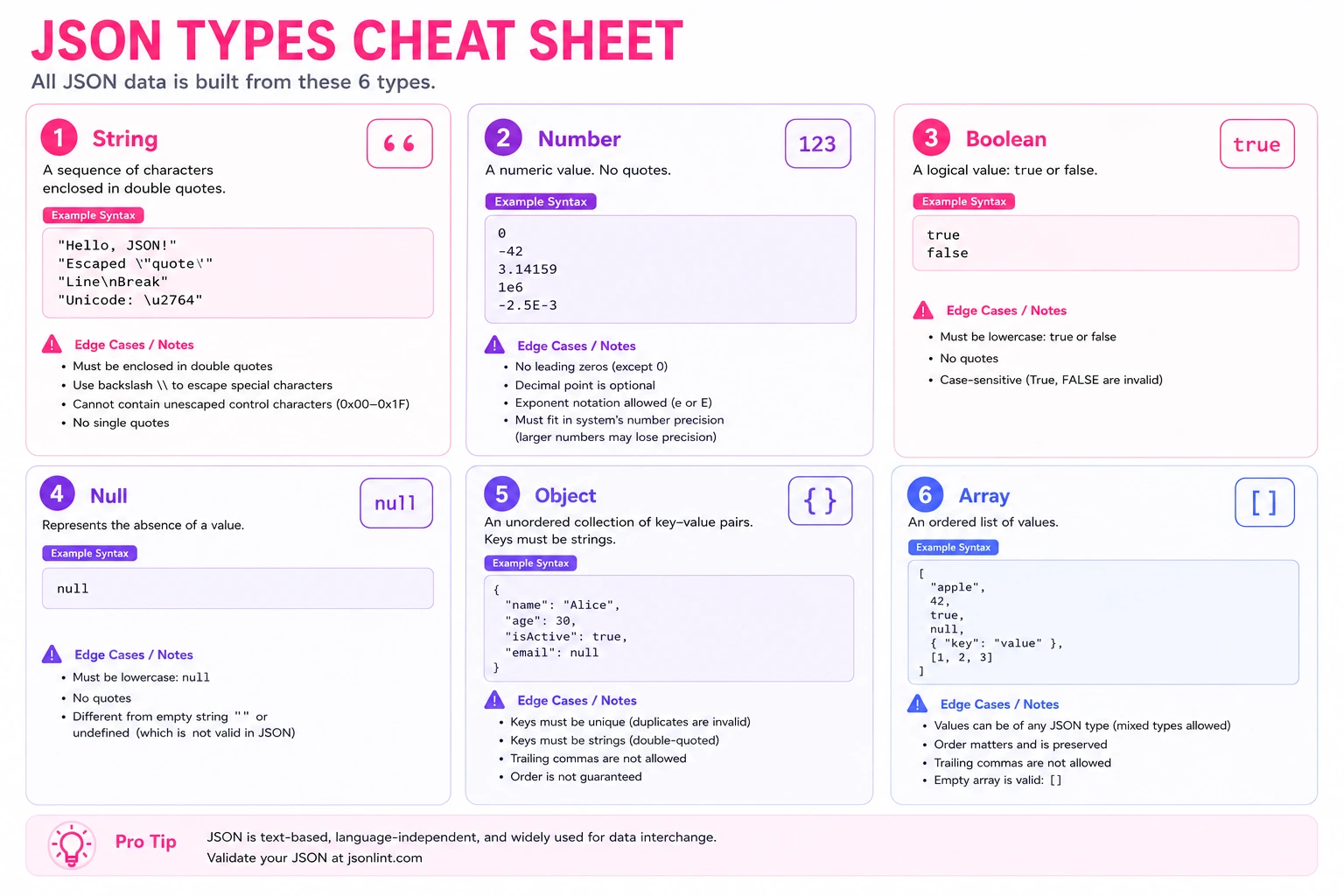
JSON has exactly six data types. No more, no less. Understanding their boundaries prevents entire categories of bugs.
Strings (and the Unicode Escape Gotchas)
JSON strings must use double quotes. They support Unicode escape sequences (\uXXXX), but characters outside the Basic Multilingual Plane require surrogate pairs:
{
  "emoji": "\uD83D\uDE00",
  "direct_utf8": "😀",
  "newline_escaped": "line one\nline two",
  "tab_escaped": "column1\tcolumn2"
}
Both representations above are valid. Most modern parsers handle direct UTF-8 correctly, but if you are working with systems that generate escape sequences (some Java serializers do this by default), you will encounter surrogate pairs in the wild.
Numbers (Precision Limits, No Infinity, No NaN)
This is where JSON causes real production bugs. JSON numbers have no precision specification in the format itself. The spec says parsers may impose limits. In practice:
{
  "safe_integer": 9007199254740991,
  "unsafe_integer": 9007199254740993,
  "float": 3.141592653589793,
  "scientific": 1.23e10,
  "negative": -42
}
JavaScript's Number.MAX_SAFE_INTEGER is 9007199254740991 (2^53 - 1). Parse an integer larger than this with JSON.parse() and you get silent data corruption:
JSON.parse('{"id": 9007199254740993}');
// Result: { id: 9007199254740992 } — WRONG! Last digit changed silently.
I have seen this break Snowflake IDs (which are 64-bit integers) and financial transaction IDs from banking APIs. The fix: transmit large integers as strings, or use a library like json-bigint that preserves precision.
Also absent from JSON: Infinity, -Infinity, and NaN. These are valid JavaScript values but will throw if you try to serialize them:
JSON.stringify({ value: Infinity }); // '{"value":null}' — silently converts!
JSON.stringify({ value: NaN }); // '{"value":null}' — same silent conversion
Booleans and Null
Straightforward, but one gotcha: null in JSON is not the same as a missing key. This semantic difference matters for PATCH operations and database updates:
{
  "name": "Alice",
  "nickname": null,
  "age": 30
}
Here, nickname is explicitly set to null (meaning "clear this field"), while a key like phone simply does not exist (meaning "do not modify this field"). Many APIs distinguish between these two cases for partial updates.
Objects (Unordered Keys, and This Matters)
The JSON specification explicitly states that objects are unordered collections of key-value pairs. This means:
{ "name": "Alice", "age": 30 }and
{ "age": 30, "name": "Alice" }are semantically identical. If your code depends on key ordering (for example, generating a hash or signature from a JSON string), you need canonical serialization. I once spent a full day debugging a webhook signature verification failure because our serializer ordered keys alphabetically while the sender used insertion order.
Arrays
Arrays are ordered. Unlike objects, the position of elements carries meaning. This seems obvious, but it matters when you are diffing JSON: reordering array elements is a semantic change, while reordering object keys is not.
What JSON Cannot Represent
- Dates: No native date type. Use ISO 8601 strings (
"2026-05-22T10:00:00Z") or Unix timestamps (1716364800). Pick one convention and enforce it across your API. - Binary data: No byte arrays. Use Base64 encoding in a string field, or serve binary via a separate endpoint.
- Undefined: Does not exist in JSON.
JSON.stringify({ a: undefined })produces'{}'. - Functions/Symbols: Not serializable. JSON is data, not code.
- Comments: As discussed above, intentionally excluded.
JSON in the Real World
JSON is not just "API responses." It has become the default serialization format across nearly every layer of modern software. Here is where you will encounter it and what to watch for in each context.
REST APIs (Request and Response Bodies)
The most common use case. A typical Stripe webhook payload looks like this:
{
  "id": "evt_1PxKBz2eZvKYlo2C0YPxmR4q",
  "object": "event",
  "api_version": "2024-06-20",
  "created": 1716364800,
  "type": "payment_intent.succeeded",
  "data": {
    "object": {
      "id": "pi_3PxKBz2eZvKYlo2C0tRmK1wB",
      "amount": 2499,
      "currency": "usd",
      "status": "succeeded",
      "payment_method": "pm_1PxKBz2eZvKYlo2CxNq8vTRe",
      "metadata": {
        "order_id": "ORD-2024-78432",
        "customer_tier": "premium"
      }
    }
  },
  "livemode": true
}
Notice: amounts in cents (not dollars), timestamps as Unix integers, nested objects three levels deep, and metadata as a flat key-value map. Every payment API has these conventions, and understanding the JSON structure is the first step to integrating correctly.
Configuration Files
Your project likely has a dozen JSON config files already:
{
  "compilerOptions": {
    "target": "ES2022",
    "module": "NodeNext",
    "strict": true,
    "outDir": "./dist",
    "rootDir": "./src",
    "resolveJsonModule": true,
    "esModuleInterop": true,
    "paths": {
      "@/*": ["./src/*"],
      "@/components/*": ["./src/components/*"]
    }
  },
  "include": ["src/**/*.ts"],
  "exclude": ["node_modules", "dist"]
}
This is a real tsconfig.json. Config files push JSON to its limits because humans edit them directly, which is why trailing commas and comments are the two most requested features that JSON will never have. Tools like OnlineJSONFormatt help catch syntax errors in config files before they break your build pipeline.
Data Storage (MongoDB Documents)
MongoDB stores documents as BSON (Binary JSON), but you interact with them as JSON:
{
  "_id": { "$oid": "665e2a1b4f1c2d3e4f5a6b7c" },
  "email": "alice@company.com",
  "profile": {
    "firstName": "Alice",
    "lastName": "Chen",
    "preferences": {
      "theme": "dark",
      "notifications": {
        "email": true,
        "push": false,
        "frequency": "weekly"
      }
    }
  },
  "orders": [
    { "id": "ORD-001", "total": 149.99, "status": "delivered" },
    { "id": "ORD-002", "total": 89.5, "status": "processing" }
  ],
  "createdAt": { "$date": "2024-06-03T14:30:00Z" },
  "lastLogin": { "$date": "2026-05-21T09:15:00Z" }
}
The $oid and $date wrappers are MongoDB's Extended JSON notation for types that standard JSON cannot represent natively. This is a common pattern: extend JSON's type system through conventions rather than format changes.
Message Queues (Kafka and RabbitMQ Payloads)
Event-driven architectures serialize events as JSON:
{
  "eventId": "a1b2c3d4-e5f6-7890-abcd-ef1234567890",
  "eventType": "user.subscription.upgraded",
  "timestamp": "2026-05-22T08:30:00Z",
  "version": "2.1",
  "source": "billing-service",
  "data": {
    "userId": "usr_8kT3mNpQ",
    "previousPlan": "starter",
    "newPlan": "professional",
    "effectiveDate": "2026-06-01T00:00:00Z",
    "monthlyAmount": 49.0
  },
  "metadata": {
    "correlationId": "req_xY7zW9vU",
    "traceId": "trace-abc123def456"
  }
}
Schema evolution is critical here. Adding fields is safe (consumers ignore unknown keys), but removing or renaming fields breaks downstream consumers. This is why the version field exists.
Structured Logging
Modern logging systems output JSON for machine parseability:
{
  "level": "error",
  "timestamp": "2026-05-22T03:14:22.847Z",
  "service": "payment-gateway",
  "traceId": "1-665e2a1b-abcdef012345",
  "message": "Payment processing failed",
  "error": {
    "code": "CARD_DECLINED",
    "provider": "stripe",
    "declineCode": "insufficient_funds"
  },
  "context": {
    "userId": "usr_8kT3mNpQ",
    "amount": 2499,
    "currency": "usd",
    "retryCount": 2
  }
}
When you are debugging production issues at 3 AM, being able to paste these log entries into a JSON formatter and navigate the structure visually is the difference between a 5-minute fix and a 45-minute investigation.
JSON vs Alternatives: When to Use What
JSON is not always the right choice. Here is an honest comparison based on real project decisions I have made.
JSON vs XML (Structured Data with Attributes)
XML still dominates in enterprise integrations, SOAP APIs, and document formats (DOCX, SVG, RSS/Atom feeds). The key difference: XML has attributes, namespaces, and mixed content. JSON does not.
<! -- XML can express this naturally -- >
<payment currency="USD" status="completed">
  <amount>24.99</amount>
  <customer id="cust_123" tier="premium">
    <name>Alice Chen</name>
  </customer>
</payment>
{
"payment": {
"currency": "USD",
"status": "completed",
"amount": 24.99,
"customer": {
"id": "cust_123",
"tier": "premium",
"name": "Alice Chen"
}
}
}Use XML when: you need attributes on elements, mixed content (text with inline markup), or you are integrating with systems that require it (SOAP, RSS, Android layouts). Use the JSON to XML converter when you need to bridge between the two formats.
Use JSON when: you are building REST APIs, storing documents, or working in any JavaScript-heavy environment.
JSON vs YAML (Human-Editable Configuration)
YAML is a superset of JSON (every valid JSON file is valid YAML). Its advantage is readability for human-edited files:
# Kubernetes deployment (YAML is natural here)
apiVersion: apps/v1
kind: Deployment
metadata:
  name: payment-service
  labels:
    app: payments
    environment: production
spec:
  replicas: 3
  selector:
    matchLabels:
      app: payments
The equivalent JSON is significantly more verbose and harder to edit by hand. But YAML has its own problems: significant whitespace (a misplaced space breaks everything), implicit type coercion (yes becomes boolean true, 3.10 becomes float 3.1), and multiple ways to express the same thing.
Use YAML when: humans edit the file regularly (Kubernetes, Docker Compose, GitHub Actions, Ansible). Convert between formats with a JSON to YAML tool when you need to switch contexts.
Use JSON when: machines generate and consume the data, or when you need unambiguous parsing.
JSON vs TOML (Simple Configuration)
TOML is designed specifically for configuration files. It handles the cases where JSON is too strict (no comments, no trailing commas) and YAML is too complex (implicit typing, anchors):
[database]
host = "localhost"
port = 5432
name = "myapp_production"
max_connections = 25

[database.ssl]
enabled = true
cert_path = "/etc/ssl/certs/db.pem"
Use TOML when: you need a simple, flat-ish config file that humans edit (Rust's Cargo.toml, Python's pyproject.toml).
Use JSON when: your config is deeply nested, programmatically generated, or consumed by JavaScript tooling.
JSON vs Protocol Buffers (High-Performance APIs)
Protocol Buffers (protobuf) are Google's binary serialization format. They require a schema definition (.proto file) and generate typed code:
message PaymentEvent {
  string event_id = 1;
  string event_type = 2;
  int64 timestamp_ms = 3;
  PaymentData data = 4;
}

message PaymentData {
  string user_id = 1;
  int32 amount_cents = 2;
  string currency = 3;
}
Protobuf payloads are 3-10x smaller than equivalent JSON and parse 5-20x faster. But they are not human-readable, require schema compilation, and add build complexity.
Use Protobuf when: you control both client and server, need maximum performance (gRPC services, high-throughput event streams), or need strict schema enforcement.
Use JSON when: you need human readability, work with third-party APIs, or value simplicity over raw performance.
JSON vs Parquet (Analytics and Big Data)
Parquet is a columnar storage format designed for analytical queries on large datasets:
Use Parquet when: you are storing data for analytics (data warehouses, Spark jobs, BigQuery), have millions of rows, or need efficient column-level compression. You can explore Parquet files directly in the browser with the Parquet Viewer.
Use JSON when: you need row-level access, human readability, or are working with small to medium datasets.
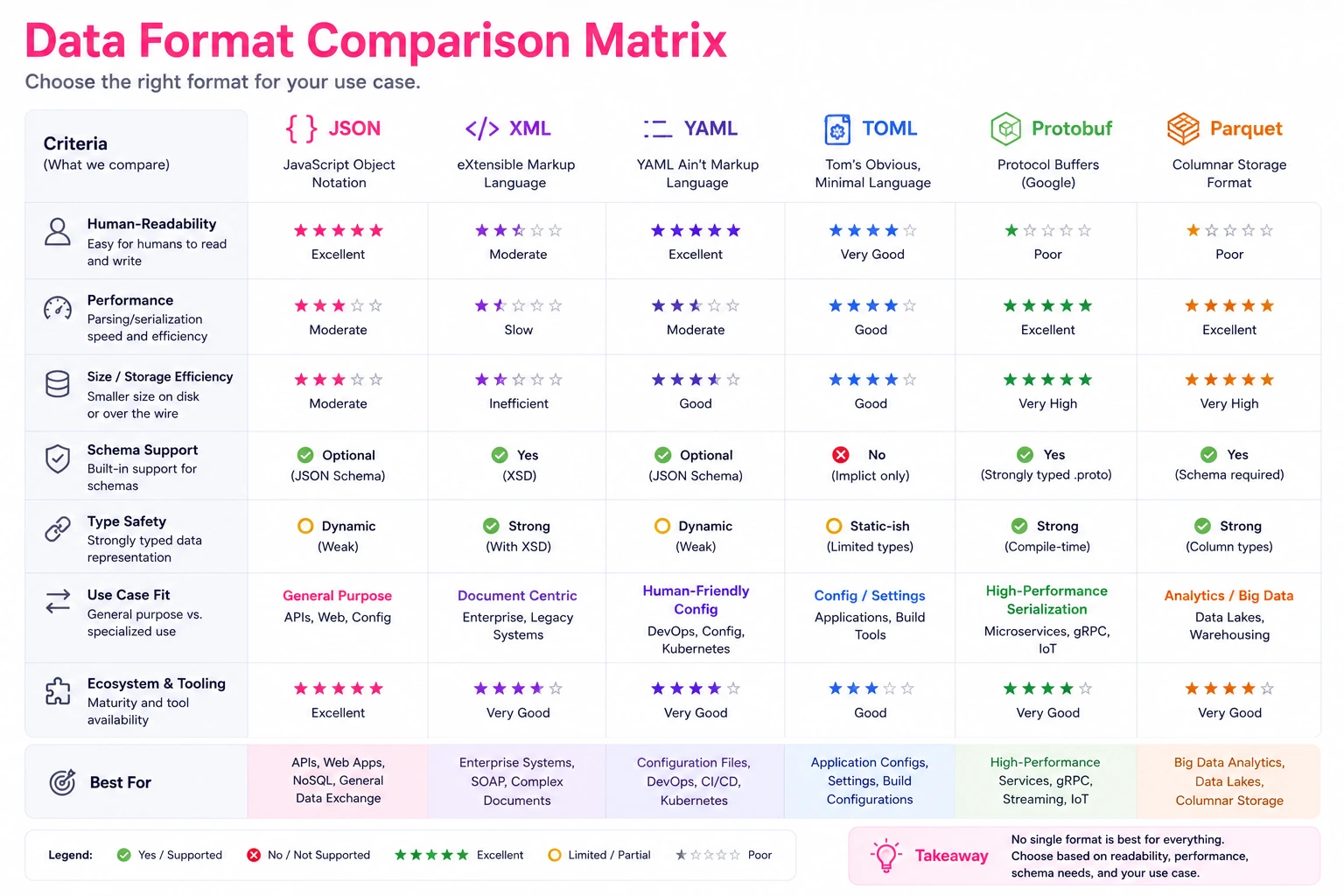
Comparison Summary
| Format | Best For | Human Readable | Schema Required | Typical Size vs JSON |
|---|---|---|---|---|
| JSON | APIs, configs, documents | Yes | No | 1x (baseline) |
| XML | Enterprise, documents, markup | Somewhat | Optional (XSD) | 1.5-2x larger |
| YAML | Human-edited config | Very | No | 0.7-0.9x |
| TOML | Simple flat config | Very | No | 0.6-0.8x |
| Protocol Buffers | High-performance services | No | Yes | 0.1-0.3x |
| Parquet | Analytics, columnar queries | No | Embedded | 0.05-0.2x |
JSON Patterns and Anti-Patterns
After building and consuming dozens of APIs, certain patterns consistently lead to maintainable systems while others create technical debt. Here are the ones that matter most.
The Envelope Pattern
Every production API should wrap responses in a consistent envelope:
{
  "data": {
    "id": "usr_8kT3mNpQ",
    "email": "alice@company.com",
    "plan": "professional"
  },
  "meta": {
    "requestId": "req_xY7zW9vU",
    "timestamp": "2026-05-22T10:00:00Z",
    "version": "2.1"
  }
}
For errors, use RFC 7807 Problem Details:
{
  "type": "https://api.example.com/errors/insufficient-funds",
  "title": "Payment Failed",
  "status": 402,
  "detail": "Card ending in 4242 was declined due to insufficient funds.",
  "instance": "/payments/pi_3PxKBz2eZvKYlo2C",
  "traceId": "trace-abc123def456"
}
This pattern gives every consumer a predictable structure to parse, regardless of whether the request succeeded or failed.
Pagination Patterns
Cursor-based pagination scales better than offset-based for large datasets:
{
  "data": [
    { "id": "ord_001", "total": 149.99 },
    { "id": "ord_002", "total": 89.5 },
    { "id": "ord_003", "total": 234.0 }
  ],
  "pagination": {
    "hasMore": true,
    "nextCursor": "eyJpZCI6Im9yZF8wMDMiLCJjcmVhdGVkQXQiOiIyMDI2LTA1LTIyIn0=",
    "pageSize": 3
  }
}
Offset pagination (?page=5&limit=20) breaks when items are inserted or deleted between requests. Cursor pagination is stable regardless of concurrent modifications.
Anti-Pattern: Deeply Nested Structures
I have seen APIs return responses nested 8+ levels deep. This makes client code fragile:
{
  "response": {
    "result": {
      "data": {
        "user": {
          "profile": {
            "settings": {
              "notifications": {
                "email": {
                  "enabled": true
                }
              }
            }
          }
        }
      }
    }
  }
}
Every level of nesting is a potential null pointer exception in the client. Flatten where possible:
{
  "userId": "usr_8kT3mNpQ",
  "emailNotificationsEnabled": true
}
If you inherit a deeply nested API response and need to understand its structure, a tree view makes navigation manageable.
Anti-Pattern: Using JSON for Binary Data
Do not embed large binary payloads as Base64 strings in JSON. A 1 MB image becomes 1.33 MB after Base64 encoding, plus the overhead of JSON string escaping. Instead, use a separate endpoint for binary data and reference it with a URL:
{
  "documentId": "doc_7Yz3mK",
  "fileName": "invoice-2026-05.pdf",
  "downloadUrl": "https://api.example.com/documents/doc_7Yz3mK/download",
  "sizeBytes": 245780,
  "mimeType": "application/pdf"
}
Anti-Pattern: Inconsistent Null Handling
Pick a convention and enforce it. These three representations mean different things in most APIs:
{ "middleName": null }      // Field exists, value is explicitly empty
{ "middleName": "" }        // Field exists, value is an empty string
{}                          // Field does not exist (omitted)
Document which convention your API uses for PATCH operations. Many bugs come from treating these as interchangeable.
The JSON Ecosystem
JSON itself is minimal by design, but a rich ecosystem of standards has grown around it to handle the features the core format intentionally omits.
JSON Schema (Validation)
JSON Schema lets you define the expected structure of a JSON document and validate data against it:
{
  "$schema": "https://json-schema.org/draft/2020-12/schema",
  "type": "object",
  "required": ["email", "plan"],
  "properties": {
    "email": {
      "type": "string",
      "format": "email"
    },
    "plan": {
      "type": "string",
      "enum": ["starter", "professional", "enterprise"]
    },
    "maxUsers": {
      "type": "integer",
      "minimum": 1,
      "maximum": 1000
    }
  }
}
Use JSON Schema for API contract validation, form validation, and configuration file validation. Libraries like Ajv (JavaScript), jsonschema (Python), and everit-org (Java) implement the spec.
JSON Patch (RFC 6902, Partial Updates)
JSON Patch defines a format for describing changes to a JSON document:
[
  { "op": "replace", "path": "/plan", "value": "enterprise" },
  { "op": "add", "path": "/maxUsers", "value": 500 },
  { "op": "remove", "path": "/trialEndsAt" }
]
This is more efficient than sending the entire document for small changes, and it makes the intent of each modification explicit. Useful for collaborative editing, audit logs, and bandwidth-constrained environments.
JSON Pointer (RFC 6901, Addressing)
JSON Pointer provides a string syntax for identifying a specific value within a JSON document:
/data/customer/address/city     → references the city field
/orders/0/items/2/price         → references the price of the 3rd item in the 1st order
JSON Pointer is used within JSON Patch (the path field) and in JSON Schema references ($ref). It is the JSON equivalent of XPath for XML.
JSON:API (Specification for API Responses)
JSON:API is an opinionated specification for building APIs that standardizes how resources, relationships, pagination, filtering, and error responses are structured:
{
  "data": {
    "type": "articles",
    "id": "1",
    "attributes": {
      "title": "JSON for Developers",
      "body": "..."
    },
    "relationships": {
      "author": {
        "data": { "type": "people", "id": "42" }
      }
    }
  },
  "included": [
    {
      "type": "people",
      "id": "42",
      "attributes": {
        "name": "Alice Chen"
      }
    }
  ]
}
Adopting JSON:API eliminates bikeshedding about response structure across your team. The tradeoff is verbosity and a learning curve for consumers unfamiliar with the spec.
NDJSON (Newline-Delimited JSON, Streaming)
NDJSON (also called JSON Lines) puts one JSON object per line, enabling streaming processing:
{"event":"page_view","userId":"usr_001","timestamp":"2026-05-22T10:01:00Z"}
{"event":"button_click","userId":"usr_001","timestamp":"2026-05-22T10:01:05Z"}
{"event":"purchase","userId":"usr_001","timestamp":"2026-05-22T10:02:30Z","amount":49.99}
Each line is independently parseable, which means you can process a 10 GB file line by line without loading it all into memory. NDJSON is the standard format for log shipping (Elasticsearch Bulk API), data streaming, and large dataset exports.
Working with JSON Effectively
Formatting and Validation Workflow
After years of working with JSON daily, my workflow has settled into a consistent pattern:
- Capture the raw JSON (from an API response, log file, or config)
- Format it with consistent indentation to make the structure visible
- Validate against the expected spec (RFC 8259 for strictness, or skip validation when you just need to read it)
- Navigate using tree view for deeply nested structures, or search for specific keys
- Transform if needed (filter fields, convert format, compare versions)
A tool like OnlineJSONFormatt handles this entire pipeline in one place without uploading your data anywhere.
Essential Practices for Every Developer
Always use JSON.stringify() for serialization. Never build JSON strings through concatenation:
// WRONG: String concatenation breaks on special characters
const bad = '{"name": "' + userName + '"}';
// If userName contains a quote: {"name": "O"Brien"} — invalid JSON

// RIGHT: Let the serializer handle escaping
const good = JSON.stringify({ name: userName });
// Produces: {"name":"O\"Brien"} — properly escaped
Use JSON.stringify(obj, null, 2) for debugging, not production. The third argument adds indentation. Useful for logs and debugging, but adds 30-60% to payload size in production responses.
Handle parsing errors gracefully:
function safeParse(jsonString) {
  try {
    return { data: JSON.parse(jsonString), error: null };
  } catch (e) {
    return { data: null, error: e.message };
  }
}

// Usage
const result = safeParse(untrustedInput);
if (result.error) {
  console.error(`Invalid JSON at: ${result.error}`);
  // "Unexpected token } in JSON at position 42"
}
Validate before you trust. JSON.parse() only confirms syntax validity. It does not confirm that the data matches your expected structure. Combine parsing with runtime validation (Zod, Joi, or JSON Schema) for any data from external sources.
Browser DevTools JSON Features You Might Not Know
- Copy as JSON in the Network tab: right-click any request payload or response and copy the formatted JSON directly
- Console
copy()function:copy(JSON.stringify(someObject, null, 2))copies formatted JSON to your clipboard from the console $_in console: references the result of the last expression, useful for chaining JSON transformations- JSON viewer extensions: most browsers have extensions that auto-format JSON responses, but they cannot handle files over a few MB (that is where dedicated tools help)
Conclusion
JSON's power comes from its constraints. No comments means universal parsing. No trailing commas means unambiguous syntax. No date type means every parser in every language produces identical results. These are not limitations to work around but design decisions that made JSON the universal data interchange format.
The developers who work most effectively with JSON understand these boundaries and work within them: using ISO 8601 strings for dates, transmitting large integers as strings, choosing cursor pagination over offset, and validating structure beyond just syntax.
Whether you are debugging a Stripe webhook at midnight, designing a new API's response format, or choosing between JSON and Protobuf for your next microservice, the patterns in this guide will help you make informed decisions rather than defaulting to whatever you used last time.
For the daily work of formatting, validating, comparing, and converting JSON, OnlineJSONFormatt handles the entire workflow client-side without touching your data. But more important than any tool is understanding the format itself, which is what this guide aimed to provide.