
Introduction
Debugging a 12MB API response at 11 PM on a Friday. The payload is a nested mess of escaped strings, trailing commas, and keys that someone decided to quote inconsistently. Your browser-based editor chokes. The desktop app wants a license key. The random site you found is uploading your production data to who-knows-where.
I've been in that exact spot more times than I'd like to admit. That frustration is precisely why we built OnlineJSONFormatt a free, browser-based JSON editor that processes everything locally, handles massive files without flinching, and actually tells you what broke and where.
This isn't a generic "top 10 tools" listicle. I'm going to walk you through the real problems we solved, the engineering decisions behind them, and why thousands of developers have made this their daily driver for JSON work.
Why a Good JSON Editor Matters More Than You Think
JSON is the backbone of modern development. Every REST API, every config file, every NoSQL document it's all JSON. According to RFC 8259, the format is deceptively simple: key-value pairs, arrays, strings, numbers, booleans, and null. But simplicity at the spec level doesn't mean simplicity in practice.
Here's what actually goes wrong:
- A missing comma on line 847 of a 2,000-line config crashes your deployment pipeline
- An API returns escaped JSON inside a string field, and you need to unwrap it
- Two team members edit the same config, and you need to see exactly what changed structurally (not just textually)
- You need to extract 3 fields from a 50-field object across 10,000 array items
These aren't edge cases. They're Tuesday. And most online editors handle maybe the first one poorly.
The Problem With Most Online JSON Editors
I've tried dozens of them. Here's the pattern:
- They upload your data. Paste production credentials into a random site? No thanks.
- They crash on large files. Anything over 1–2 MB and the tab freezes.
- Error messages are useless. "Syntax error" — great, but where?
- They do one thing. Format here, validate there, compare somewhere else. Five tabs for one workflow.
- Ads everywhere. Pop-ups covering the output panel while you're debugging a production incident.
We built OnlineJSONFormatt to solve all of these simultaneously.
What Makes OnlineJSONFormatt Different: Real Engineering, Not Just a Pretty UI
Client-Side Processing "Your Data Never Leaves Your Browser"
This isn't marketing fluff. Every operation formatting, validation, diffing, conversion runs entirely in your browser. We use WebAssembly (WASM) compiled from Rust for performance-critical operations like JSON diffing and CSV conversion. Web Workers handle heavy computation without blocking the UI thread.
What this means in practice:
- Paste sensitive production data without worrying about server logs
- Works offline after the first load (PWA-capable)
- No rate limits, no file size restrictions imposed by server bandwidth
- GDPR/HIPAA-friendly by design there's no data to protect because we never receive it
WASM-Powered JSON & XML Diff Engine
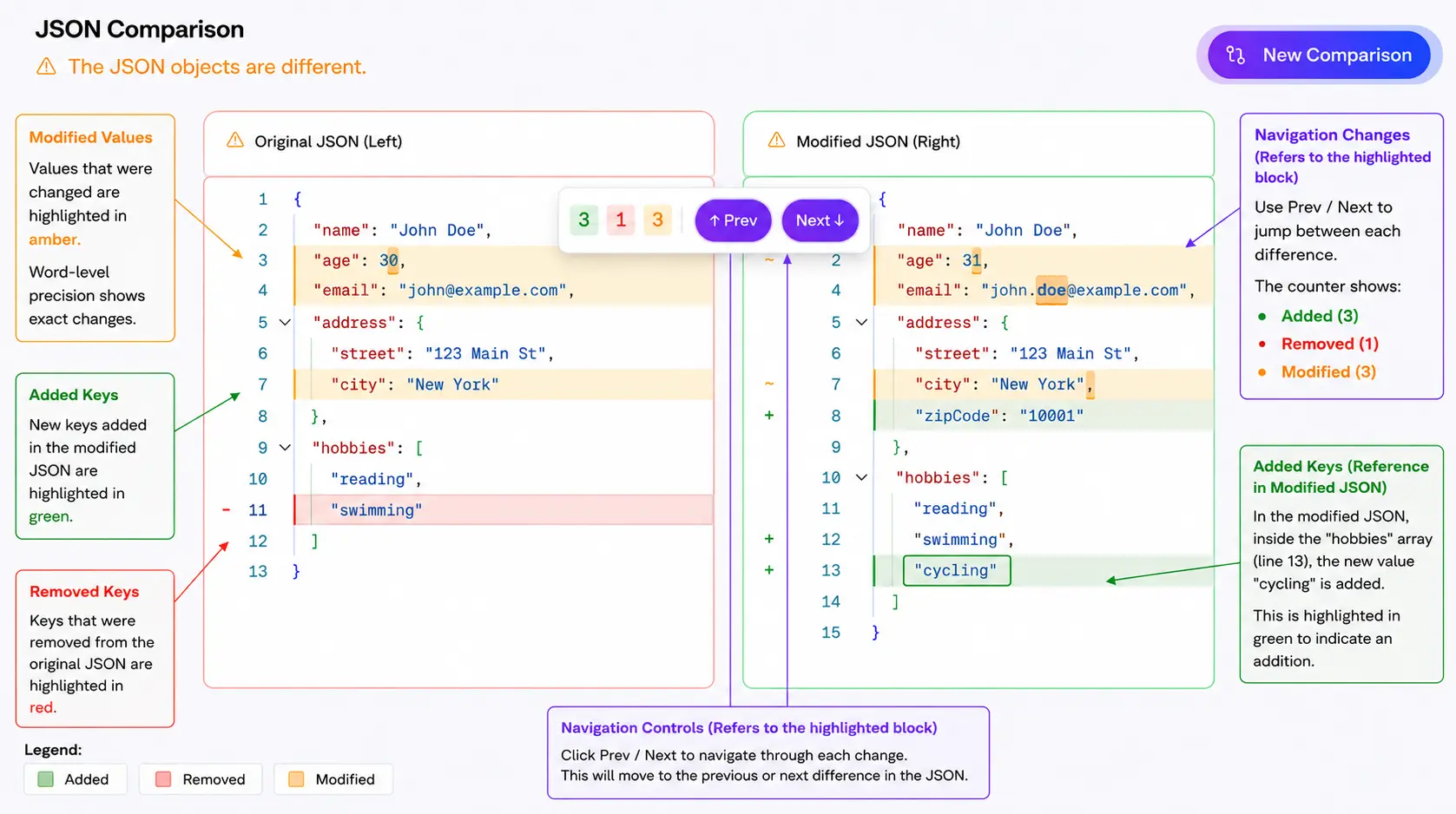
Our Compare JSON tool doesn't do naive text diffing. The Rust-compiled WASM module understands JSON structure. It detects:
- Added keys (highlighted green)
- Removed keys (highlighted red)
- Modified values (highlighted amber with word-level precision)
- Structural changes in deeply nested objects
This matters when you're comparing two API response versions and need to know that user.preferences.notifications.push changed from true to false not that "line 47 is different."
AI-Powered JSON Repair (Two-Tier Approach)
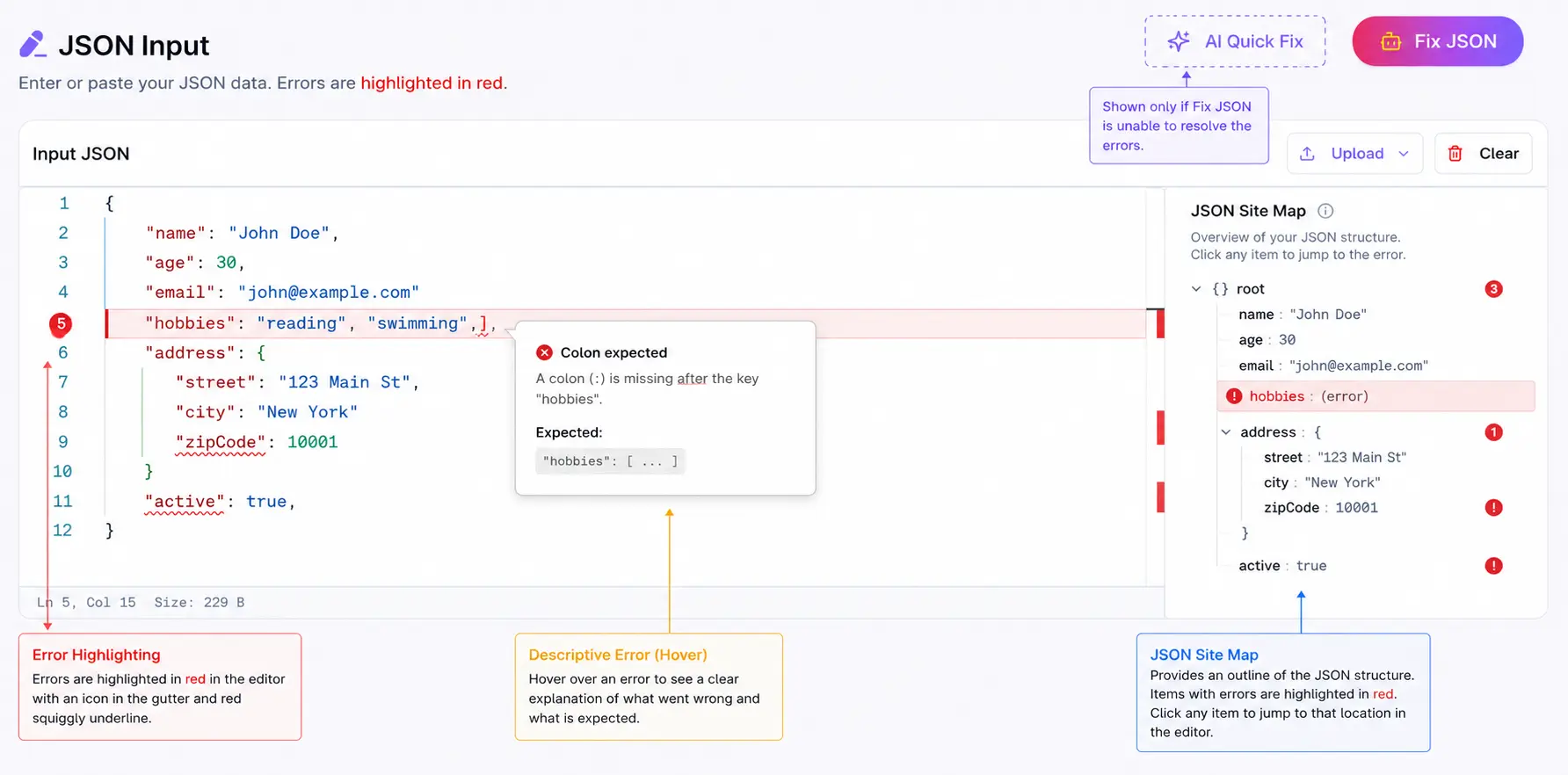
The Fix JSON tool uses a two-tier repair strategy:
Tier 1 - Deterministic Auto-Fix: A rule-based repair engine handles common structural errors instantly:
- Trailing commas (
{"name": "John",}→{"name": "John"}) - Missing commas between properties
- Unquoted keys (
{name: "John"}→{"name": "John"}) - Single quotes instead of double quotes
- Unclosed brackets and braces
- UTF-8 encoding issues
Tier 2 - AI Fallback:
When the structural damage is too complex for deterministic rules (e.g., multiple nested errors, ambiguous intent), the tool falls back to an AI model that understands JSON semantics and can reconstruct the intended structure.
Each fix produces a versioned output with a clear list of what was corrected. You see exactly what changed.
Filter & Transform: The Feature Most Editors Don't Have
This is the one that surprises people. You have a 10,000-item JSON array from an API. You need items where status == "active" and you only want the id, name, and email fields.
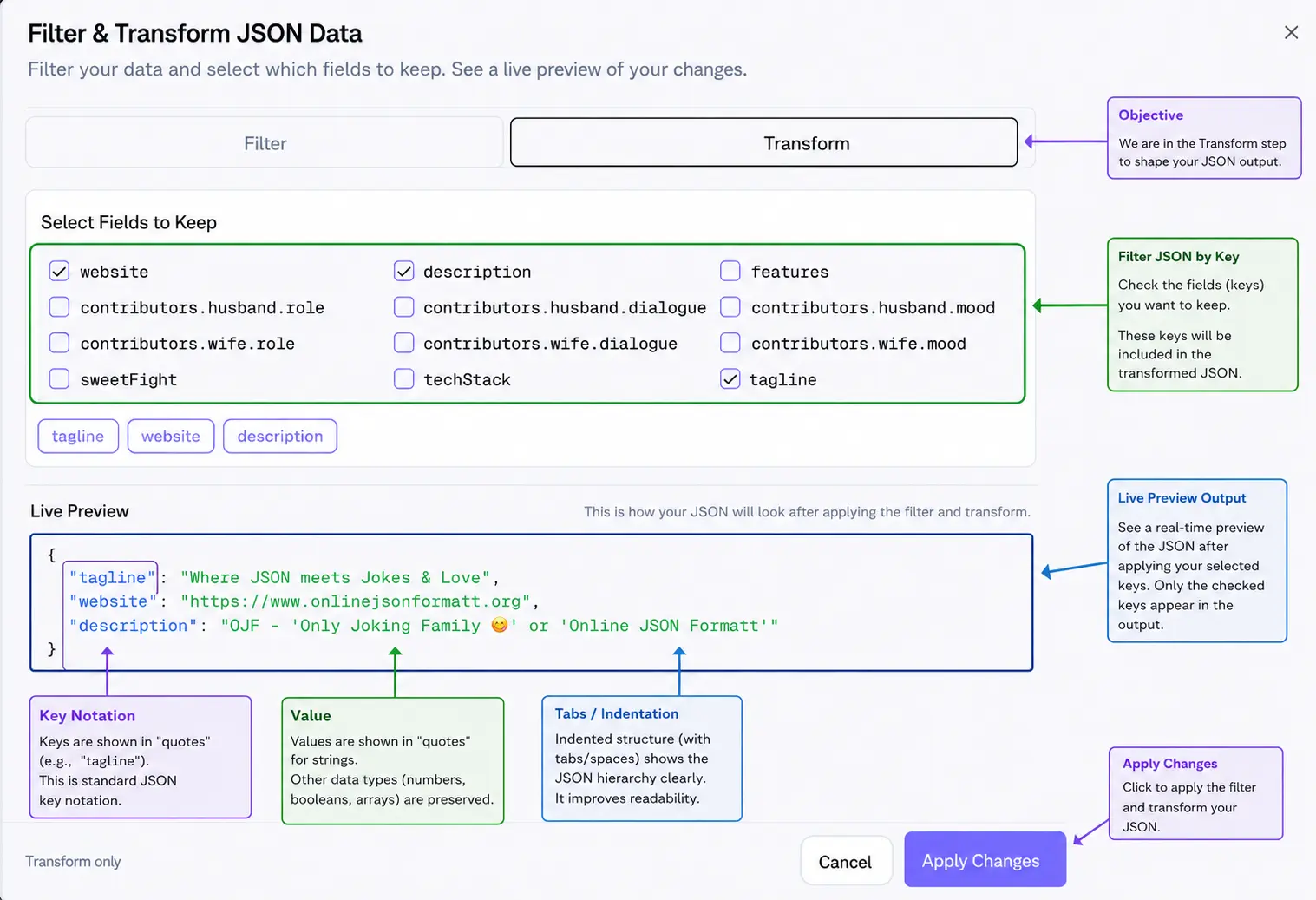
Most editors? Copy the JSON, write a script, run it, paste the result back. With OnlineJSONFormatt's JSON Formatter, you click the Filter icon and:
- Filter - Pick a field, choose an operator (
==,!=,>,<,contains,startsWith,endsWith), set a value - Transform - Check the fields you want to keep
- Preview - See the filtered result live before applying
- Apply - Get a new versioned output with only the data you need
It supports dot-notation for nested paths (address.city, preferences.notifications.email), so you can filter on deeply nested values without flattening first.
This single feature has replaced countless one-off scripts in my workflow
Formatting That Respects Your Standards
The JSON Formatter isn't just "add whitespace." It validates against multiple JSON specifications:
| Spec | Use Case |
|---|---|
| RFC 8259 | Current standard - strictest validation |
| RFC 7159 | Slightly more permissive (allows top-level primitives) |
| RFC 4627 | Legacy - only objects/arrays at top level |
| ECMA-404 | The JSON data interchange syntax standard |
| Skip Validation | When you just need formatting, errors and all |
You choose your indentation (2, 3, or 4 spaces), format, and get a versioned output. Every format operation creates a new version so you can compare v1 (raw) with v3 (filtered and reformatted) without losing anything.
Conversions That Actually Work at Scale
JSON to CSV with Column Mapping
The JSON to CSV converter uses our WASM module for column detection and conversion. But the real power is the Column Mapping Dialog:
- Auto-detects all available columns from your JSON structure
- Select which columns to include
- Rename columns (e.g.,
user.firstName→First Name) - Reorder columns by dragging
- Export as CSV, XLSX, TSV, or Parquet
That last one - Parquet export from a browser is something you won't find in most online tools. It's useful when you need to feed data into Spark, BigQuery, or any columnar analytics system.
JSON to YAML, XML, POJO, and Dart
- JSON to YAML - Essential for Kubernetes, Docker Compose, and Ansible configs
- JSON to XML - For legacy system integrations
- JSON to POJO - Generate Java classes with Lombok, Jackson, Builder pattern support
- JSON to Dart - Flutter model classes with null safety,
fromJson/toJson, and Equatable
Each converter produces versioned outputs with statistics (line count, element count, file size).
Parquet Viewer with DuckDB SQL Queries
This one's for the data engineers. The Parquet Viewer loads DuckDB compiled to WASM directly in your browser. Upload a Parquet file (up to 250 MB) and:
- Browse the schema - column names, types, nullable flags
- Query with SQL - Full DuckDB SQL support with Monaco editor autocomplete
- View results - Tabular display with pagination
- Analyze - File statistics and metadata
The SQL editor provides schema-aware autocompletion. Type SELECT and it suggests your column names. No server, no setup, no Python environment just drag, drop, and query.
Tree View for Navigating Complex Structures
The Tree View renders your JSON as a collapsible, navigable tree. Useful when you're dealing with deeply nested configs (think Terraform state files or complex API responses) and need to understand the structure before editing.
- Expand/collapse individual nodes
- See value types at a glance
- Fullscreen mode for large structures
- Works with the same file upload, URL fetch, and paste inputs as every other tool
The Versioning System: Never Lose Your Work
Every tool in OnlineJSONFormatt produces versioned outputs. Format your JSON? That's v1. Filter it? v2. Format again with different spacing? v3.
Each version is independently:
- Copyable to clipboard
- Downloadable as a file
- Removable if you don't need it
- Editable (in tools that support it)
This means you can experiment freely. Try different filter conditions, compare results, and keep the version that works all without external file management.
Multi-Language Minification
The Minify tool handles JSON, CSS, and JavaScript in one place. It shows you:
- Original size
- Minified size
- Bytes saved
- Compression percentage
Useful for optimizing config payloads, reducing bundle sizes, or just seeing how much whitespace you've been shipping to production.
JSON Escape & Unescape
The JSON Escape tool handles the annoying cases:
- API returns JSON as an escaped string inside another JSON field
- You need to embed JSON in a string literal for a test fixture
- Log files contain escaped JSON that needs to be readable
Paste the escaped mess, get clean JSON. Or go the other direction when you need to embed.
Why Privacy-First Architecture Matters for Developer Tools
Let me be direct: if a JSON tool sends your data to a server, it's a liability. I've seen teams paste database connection strings, API keys, and PII into online formatters without thinking twice.
OnlineJSONFormatt's architecture makes this a non-issue:
- No server-side processing - JavaScript + WASM in the browser
- No analytics on content - We don't see what you paste
- No account required - No email, no tracking, no profile
- Works offline - Load once, use anywhere
This isn't just a feature. It's a design principle that informed every technical decision.
Tips From Building and Using This Daily
After building and using OnlineJSONFormatt across hundreds of debugging sessions, here's what I've learned:
- Validate before deploying: Always. The 30 seconds it takes catches the error that would cost 30 minutes of rollback.
- Use Filter & Transform instead of writing scripts: If you're writing a one-off
jqcommand or Python script to extract fields, the Filter dialog is faster. - Compare before and after: When modifying configs, paste the original on the left and your changes on the right. The structural diff catches things
git diffmisses. - Pick a spec and stick with it: RFC 8259 is the current standard. If your JSON passes strict validation, it'll work everywhere.
- Minify for production, pretty-print for humans: Use 2-space indentation during development, minify before shipping.
- Use versioned outputs as a safety net: Format first (v1), then filter (v2). If the filter was wrong, v1 is still there.
- Export to Parquet for analytics: If you're feeding JSON data into a data warehouse, the Parquet export saves a conversion step.
Conclusion
OnlineJSONFormatt isn't trying to be everything to everyone. It's built for developers who work with JSON daily and need a tool that's fast, private, and genuinely capable.
Whether you're fixing a broken config at midnight, comparing API response versions during a migration, filtering thousands of records to find the one that's causing a bug, or converting a JSON payload to Parquet for your data team it handles the workflow end-to-end without switching tools.
What you get:
- A professional JSON editor with Monaco (VS Code's engine)
- Real-time validation against multiple RFC specs
- AI-powered repair that actually explains what it fixed
- Structural comparison powered by Rust/WASM
- Filter & Transform without writing code
- Multi-format conversion with column mapping
- Parquet analysis with full SQL support
- Tree visualization for complex structures
- Zero signup, zero data transmission, zero cost
Try it. Paste something broken. Watch it fix itself. That's the experience we built.