
Introduction
Three months ago I shipped an invoice processing pipeline that extracted line items from PDF images using GPT-4o. The prompt said "return JSON." In testing, it worked beautifully - clean objects, correct fields, valid syntax. In production, processing 2,000 invoices per day, it failed 6% of the time. That's 120 silent data corruption events daily.
The failures were maddening in their variety. Sometimes the model added "Here's the extracted data:" before the JSON. Sometimes it wrapped the output in markdown triple backticks. Twice it returned single-quoted keys (valid Python dicts, invalid JSON). Once it hallucinated a tax_category field that didn't exist in my schema, and my downstream pipeline dutifully wrote garbage into the database for 4 hours before alerting.
That experience taught me something every developer building on LLM APIs learns eventually: asking a model to "return JSON" is a suggestion. Making it actually return valid, schema-compliant JSON requires a fundamentally different approach.
This article covers what I've learned building production LLM pipelines over the past year - from naive prompting to guaranteed structured outputs, across OpenAI, Anthropic, and Gemini.
The Evolution: From "Please Return JSON" to Guaranteed Schema Compliance
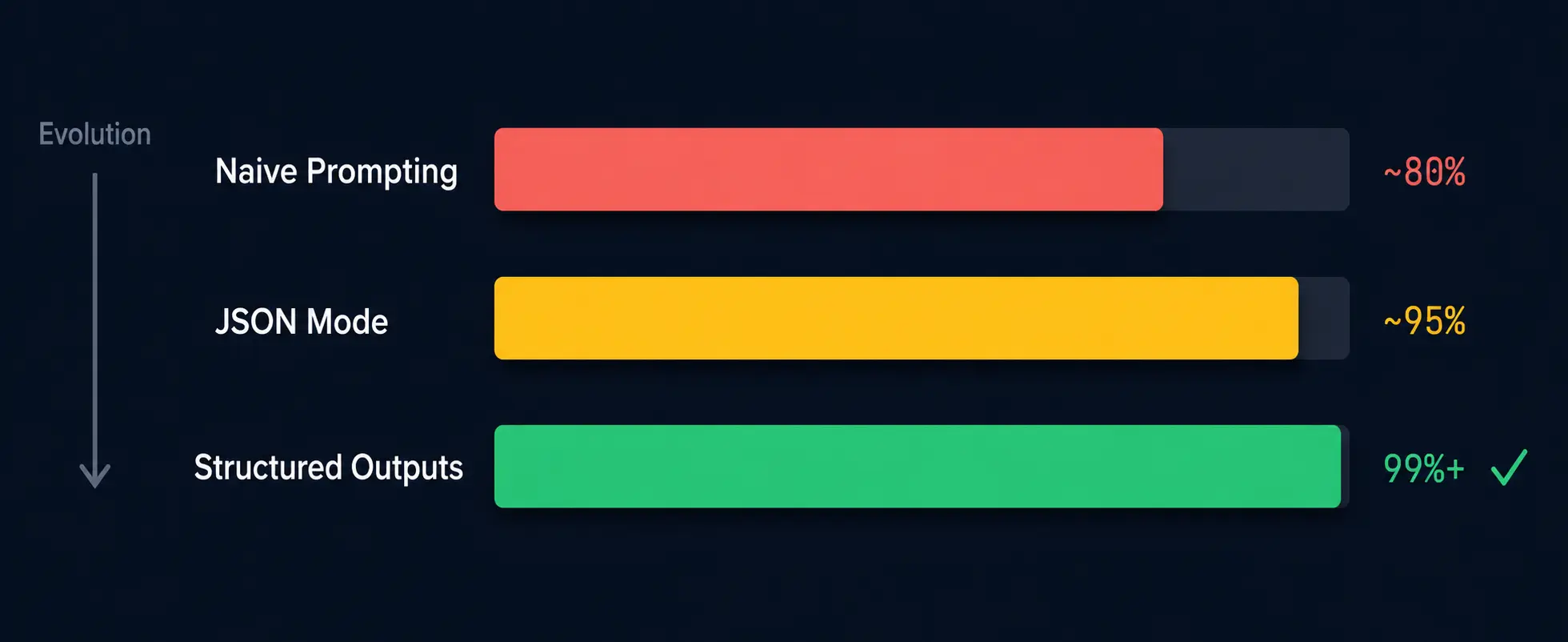
Getting JSON from LLMs has evolved through three distinct generations, each solving a different layer of the reliability problem.
Generation 1: Naive Prompting (~80% Reliability)
The earliest approach - and still what many tutorials teach is simply asking the model for JSON in the prompt:
prompt = """Extract the users name and email from this text.
Return your answer as a JSON object with keys 'name' and 'email'.

Text: 'Hi, I m Kartik Gupta and you can reach me at kartik.gupta@example.com'
"""
This works most of the time. But "most of the time" means roughly 80% in my production measurements. The other 20% includes:
- Preamble text:
"Sure! Here's the extracted information:\n{"name": "Kartik Gupta"... - Markdown fences:
```json\n{"name": "Kartik Gupta"...}\n``` - Explanatory suffixes:
{"name": "Kartik Gupta"...}\n\nI extracted the name from... - Complete refusals on edge cases:
"I cannot extract personal information from..."
At 1,000 requests per day, 80% reliability means 200 failures daily. That's not a production system - that's a prototype.
Generation 2: JSON Mode (~95% Reliability)
JSON mode was the first API-level constraint. When enabled, the model is forced to produce syntactically valid JSON - no preamble, no markdown fences, no trailing text:
from openai import OpenAI
client = OpenAI()

response = client.chat.completions.create(
    model="gpt-4o",
    messages=[
        {"role": "system", "content": "Extract user info. Return JSON with 'name' and 'email' keys."},
        {"role": "user", "content": "Hi, I'm Kartik Gupta at kartik.gupta@example.com"}
    ],
    response_format={"type": "json_object"}
)

data = json.loads(response.choices[0].message.content)
# Always valid JSON - but is it the RIGHT JSON?
JSON mode solves syntax. But it doesn't solve structure. The model might return {"full_name": "Kartik Gupta"} instead of {"name": "Kartik Gupta"}. It might add a confidence field you didn't ask for. It might use null where you expected an empty string. Valid JSON, wrong schema.
Generation 3: Structured Outputs (~99%+ Reliability)
Structured outputs are the current state of the art. You provide a JSON Schema, and the model is constrained at the decoding level to produce output that matches it exactly:
from openai import OpenAI
from pydantic import BaseModel

client = OpenAI()

class UserInfo(BaseModel):
    name: str
    email: str

response = client.beta.chat.completions.parse(
    model="gpt-4o",
    messages=[
        {"role": "system", "content": "Extract user information from the text."},
        {"role": "user", "content": "Hi, I'm Kartik Gupta at kartik.gupta@example.com"}
    ],
    response_format=UserInfo
)

user = response.choices[0].message.parsed
# user.name = "Kartik Gupta", user.email = "kartik.gupta@example.com"
# Guaranteed to match the schema. Every time.
The key difference: structured outputs use constrained decoding. The model physically cannot generate tokens that would violate the schema. It's not "trying harder to follow instructions" - it's architecturally impossible for the output to be structurally wrong.
Real Failure Modes I've Hit in Production
Before diving into solutions, here are the actual failure patterns I've encountered processing hundreds of thousands of LLM responses. Understanding these helps you decide which level of protection you need.
Failure Mode 1: Preamble and Postamble Text
The model wraps its JSON in conversational text:
Sure! Here's the extracted data in JSON format:

{"name": "Kartik Gupta", "email": "kartik.gupta@example.com"}

Let me know if you need anything else!
Frequency: ~15% of responses without JSON mode enabled, especially on longer prompts. Fix: JSON mode eliminates this entirely. Without it, regex extraction (/\{[\s\S]*\}/) works but is fragile.
Failure Mode 2: Markdown Code Fences
```json
{"name": "Kartik Gupta", "email": "kartik.gupta@example.com"}
**Frequency:** ~8% without JSON mode, more common when the system prompt mentions "code" or "developer."
**Fix:** Strip fences with regex before parsing, or enable JSON mode.
#### Failure Mode 3: Hallucinated Fields
You asked for `name` and `email`. The model returns:
```json
{
"name": "Kartik Gupta",
"email": "kartik.gupta@example.com",
"confidence": 0.95,
"source": "email signature",
"extracted_at": "2026-07-10"
}Valid JSON. Correct values. But three extra fields your downstream code doesn't expect - and if you're inserting into a strict database schema, those fields cause failures or silent data loss.
Frequency: ~12% with JSON mode (no schema constraint). Fix: Structured outputs with additionalProperties: false, or post-parse validation that strips unexpected keys.
Failure Mode 4: Type Mismatches
{
  "name": "Kartik Gupta",
  "age": "thirty-two",
  "is_active": "yes"
}
You expected age as an integer and is_active as a boolean. The model returned strings.
Frequency: ~5% with JSON mode, especially for numeric and boolean fields. Fix: JSON Schema with explicit type declarations + structured outputs.
Failure Mode 5: Truncation
Long responses hit the model's max_tokens limit and get cut off mid-JSON:
{"users": [{"name": "Kartik", "email": "Kartik@exThe response ends abruptly. finish_reason is "length" instead of "stop". JSON.parse() throws.
Frequency: Depends on output length. ~3% on my invoice pipeline (complex nested objects). Fix: Monitor finish_reason, increase max_tokens, or break large extractions into smaller chunks.
When you're debugging these in production, our Fix JSON tool handles all five failure modes - it strips preamble text, removes code fences, repairs truncated brackets, and normalizes quoting. I pipe failed LLM outputs through it as part of my recovery workflow.
Structured Outputs Across Providers: OpenAI, Anthropic, and Gemini
Each major LLM provider now offers structured output capabilities, but the API surface differs. Here's how to use each one effectively.
OpenAI: Structured Outputs with JSON Schema
OpenAI's implementation is the most mature. You define a Pydantic model (Python) or Zod schema (TypeScript), and the SDK handles schema conversion:
from openai import OpenAI
from pydantic import BaseModel
from typing import Optional
from enum import Enum

client = OpenAI()

class Priority(str, Enum):
    low = "low"
    medium = "medium"
    high = "high"
    critical = "critical"

class ExtractedTicket(BaseModel):
    title: str
    description: str
    priority: Priority
    assignee: Optional[str]
    estimated_hours: float
    tags: list[str]

response = client.beta.chat.completions.parse(
    model="gpt-4o",
    messages=[
        {"role": "system", "content": "Extract a support ticket from the customer message."},
        {"role": "user", "content": "Our checkout is completely broken since the last deploy. Nobody can buy anything. This is costing us thousands per hour. Please assign to the payments team ASAP."}
    ],
    response_format=ExtractedTicket
)

ticket = response.choices[0].message.parsed
# ticket.priority = Priority.critical (guaranteed to be a valid enum)
# ticket.estimated_hours = 2.0 (guaranteed to be a float)
# ticket.tags = ["checkout", "payments", "production"] (guaranteed list of strings)
Key constraints for OpenAI structured outputs:
- All fields must be marked
requiredin the schema (useOptional+nullfor nullable fields) additionalPropertiesmust befalseat every object level- Recursive schemas are supported (useful for tree structures)
- Maximum schema depth: 5 levels of nesting
Model choice note: The examples use gpt-4o, which I use for extraction tasks requiring vision (invoices, receipts). For text-only structured extraction, consider gpt-4.1 ($2.00/1M input, $8.00/1M output) - it's OpenAI's current recommended production model with better instruction-following at a lower price point. Both support structured outputs identically.
Anthropic Claude: Two Paths to Structured Output
Anthropic supports structured outputs through two mechanisms: native JSON schema mode (the simpler path) and tool_use (the original pattern). Both guarantee schema compliance.
Approach 1: Native JSON Schema Mode (Recommended)
The direct approach - pass a JSON Schema via output_config and get constrained JSON back:
import anthropic
import json

client = anthropic.Anthropic()

response = client.messages.create(
    model="claude-sonnet-5",
    max_tokens=1024,
    output_config={
        "format": {
            "type": "json_schema",
            "json_schema": {
                "name": "support_ticket",
                "schema": {
                    "type": "object",
                    "properties": {
                        "title": {"type": "string", "description": "Brief ticket title"},
                        "description": {"type": "string", "description": "Detailed description"},
                        "priority": {"type": "string", "enum": ["low", "medium", "high", "critical"]},
                        "assignee": {"type": "string", "description": "Team or person to assign to"},
                        "estimated_hours": {"type": "number", "description": "Estimated fix time"},
                        "tags": {"type": "array", "items": {"type": "string"}}
                    },
                    "required": ["title", "description", "priority", "estimated_hours", "tags"],
                    "additionalProperties": False
                }
            }
        }
    },
    messages=[
        {"role": "user", "content": "Our checkout is completely broken since the last deploy. Nobody can buy anything. This is costing us thousands per hour. Please assign to the payments team ASAP."}
    ]
)

ticket = json.loads(response.content[0].text)
# ticket["priority"] = "critical" (guaranteed valid enum value)
This is the most straightforward path - no tool definitions, no content block extraction. The response text is pure JSON matching your schema.
Approach 2: Tool Use (Original Pattern)
The tool_use approach predates native JSON schema mode and remains widely used. It leverages Claude's function calling infrastructure:
import anthropic

client = anthropic.Anthropic()

response = client.messages.create(
    model="claude-sonnet-5",
    max_tokens=1024,
    tools=[{
        "name": "extract_ticket",
        "description": "Extract a structured support ticket from customer message",
        "input_schema": {
            "type": "object",
            "properties": {
                "title": {"type": "string", "description": "Brief ticket title"},
                "description": {"type": "string", "description": "Detailed description"},
                "priority": {"type": "string", "enum": ["low", "medium", "high", "critical"]},
                "assignee": {"type": "string", "description": "Team or person to assign to"},
                "estimated_hours": {"type": "number", "description": "Estimated fix time"},
                "tags": {"type": "array", "items": {"type": "string"}}
            },
            "required": ["title", "description", "priority", "estimated_hours", "tags"]
        }
    }],
    tool_choice={"type": "tool", "name": "extract_ticket"},
    messages=[
        {"role": "user", "content": "Our checkout is completely broken since the last deploy. Nobody can buy anything. This is costing us thousands per hour. Please assign to the payments team ASAP."}
    ]
)

# Extract the structured data from the tool call
tool_result = response.content[0].input
# tool_result["priority"] = "critical" (guaranteed valid enum value)
When to use which: Native JSON schema mode is simpler and produces cleaner responses. Tool use is better when you're already using Claude's tool infrastructure in an agentic workflow, or when you need the model to optionally decide whether structured output is appropriate (by not forcing the tool).
Google Gemini: Response Schema
Gemini uses a response_schema parameter that accepts a JSON Schema directly:
import google.generativeai as genai

model = genai.GenerativeModel("gemini-2.5-flash")

response = model.generate_content(
    "Our checkout is completely broken since the last deploy. Nobody can buy anything. This is costing us thousands per hour. Please assign to the payments team ASAP.",
    generation_config=genai.GenerationConfig(
        response_mime_type="application/json",
        response_schema={
            "type": "object",
            "properties": {
                "title": {"type": "string"},
                "description": {"type": "string"},
                "priority": {"type": "string", "enum": ["low", "medium", "high", "critical"]},
                "assignee": {"type": "string"},
                "estimated_hours": {"type": "number"},
                "tags": {"type": "array", "items": {"type": "string"}}
            },
            "required": ["title", "description", "priority", "estimated_hours", "tags"]
        }
    )
)

import json
ticket = json.loads(response.text)
Provider Comparison
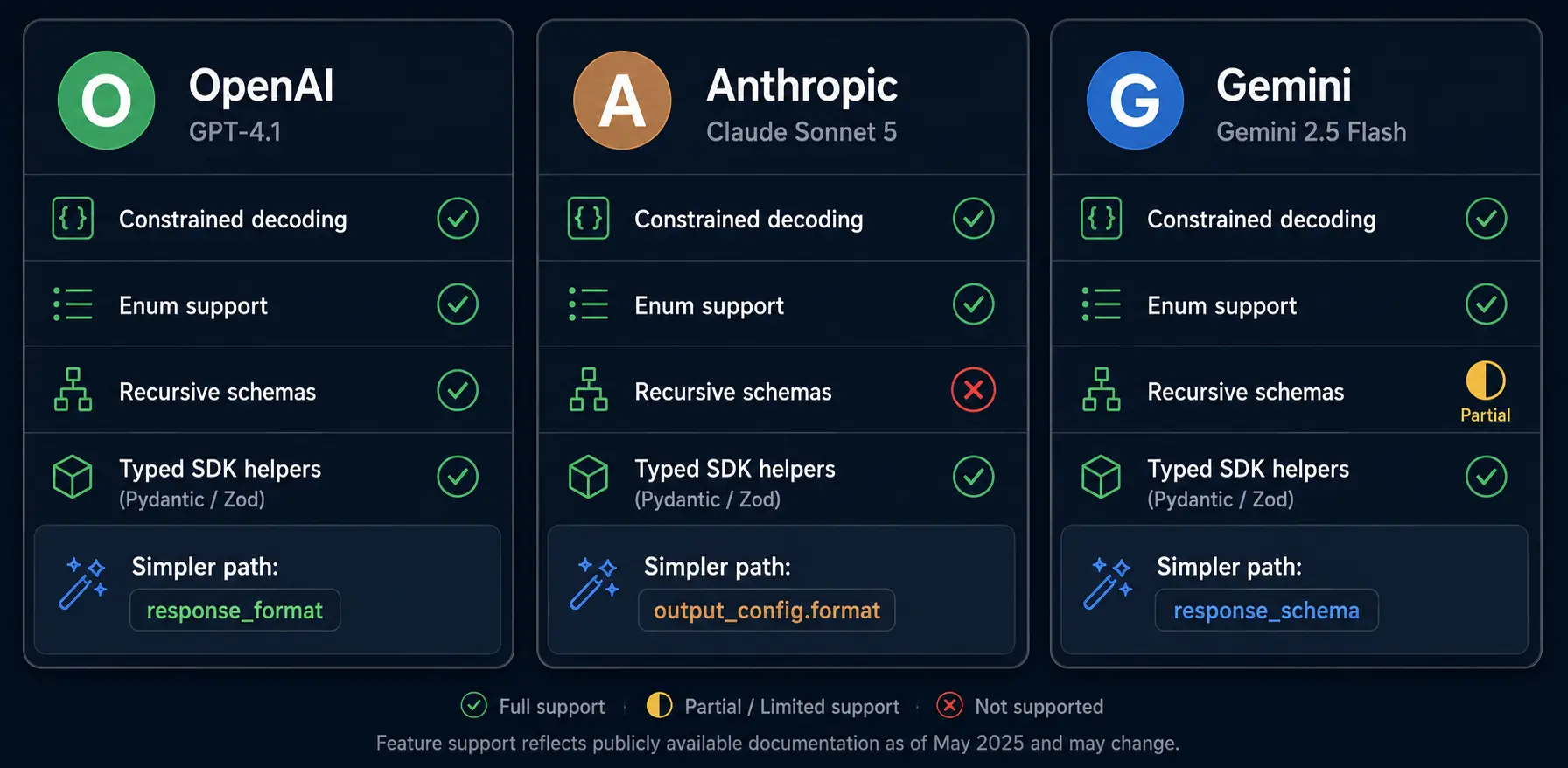
| Feature | OpenAI | Anthropic Claude | Google Gemini |
|---|---|---|---|
| Schema definition | Pydantic/Zod + JSON Schema | JSON Schema (native or via tools) | JSON Schema directly |
| Constrained decoding | Yes (strict: true) | Yes (both modes) | Yes |
| Enum support | Yes | Yes | Yes |
| Nested objects | Yes (5 levels max) | Yes | Yes |
| Recursive schemas | Yes | Limited | Partial |
| Optional/nullable fields | Via Optional type | Via non-required | Via nullable: true |
| SDK type inference | Full (Pydantic) | Full (Pydantic) | Full (Pydantic) |
| Simpler path | response_format | output_config | response_schema |
Writing Schemas That Constrain Models Effectively
Not all JSON Schemas produce equally good results from LLMs. I've learned (the hard way) which patterns lead to reliable outputs and which cause the model to struggle.
Principle 1: Be Explicit About Everything
Vague schemas produce vague outputs. Compare:
// Bad: Underspecified schema
{
  "type": "object",
  "properties": {
    "status": {"type": "string"},
    "data": {"type": "object"}
  }
}

// Good: Fully specified schema
{
  "type": "object",
  "properties": {
    "status": {
      "type": "string",
      "enum": ["success", "partial", "failed"],
      "description": "Overall extraction quality"
    },
    "data": {
      "type": "object",
      "properties": {
        "invoice_number": {"type": "string", "description": "Invoice ID like INV-2026-0042"},
        "total_amount": {"type": "number", "description": "Total in USD, e.g. 1499.99"},
        "line_items": {
          "type": "array",
          "items": {
            "type": "object",
            "properties": {
              "description": {"type": "string"},
              "quantity": {"type": "integer"},
              "unit_price": {"type": "number"}
            },
            "required": ["description", "quantity", "unit_price"],
            "additionalProperties": false
          }
        }
      },
      "required": ["invoice_number", "total_amount", "line_items"],
      "additionalProperties": false
    }
  },
  "required": ["status", "data"],
  "additionalProperties": false
}
The explicit schema includes description fields (which guide the model's understanding), enum constraints (which limit hallucination), and additionalProperties: false (which prevents extra fields).
Principle 2: Use Enums Aggressively
Every field with a finite set of valid values should be an enum. This eliminates an entire class of semantic errors:
class SentimentAnalysis(BaseModel):
    sentiment: Literal["positive", "negative", "neutral", "mixed"]
    confidence: float  # 0.0 to 1.0
    primary_emotion: Literal["joy", "anger", "sadness", "fear", "surprise", "disgust", "neutral"]
    reasoning: str
Without the enum, the model might return "mostly positive", "somewhat negative", or "POSITIVE" - all semantically reasonable but programmatically useless.
Principle 3: Keep Nesting Shallow
Every level of nesting increases the chance of structural errors (even with constrained decoding) and increases token cost. Flatten where possible:
# Avoid: Deeply nested
class DeepResult(BaseModel):
    metadata: Metadata        # level 1
      # → contains SubMetadata   # level 2
      #   → contains Details     # level 3
      #     → contains Tags      # level 4

# Prefer: Flatter structure
class FlatResult(BaseModel):
    extraction_date: str
    source_document: str
    confidence_score: float
    extracted_fields: list[ExtractedField]  # One level of nesting
In my experience, schemas with 2-3 levels of nesting produce consistently better results than those with 4-5 levels - even when the deeper schema is technically supported.
Principle 4: Provide Descriptions as Model Guidance
The description field in JSON Schema isn't just for documentation - models read it and use it to guide extraction:
{
  "properties": {
    "amount": {
      "type": "number",
      "description": "Total invoice amount in USD. Convert from other currencies if needed. Use 0.0 if no amount is found."
    }
  }
}
That description tells the model three things: the expected unit (USD), what to do with other currencies (convert), and how to handle missing data (use 0.0). Without it, you'd get inconsistent behavior across different inputs.
Building a Production Validation and Retry Pipeline
Even with structured outputs, you need a defense-in-depth approach. Structured outputs guarantee structural correctness (right keys, right types) - they don't guarantee semantic correctness (right values). Here's the pipeline I use in production.
Layer 1: Parse and Structural Validation
import { z } from "zod";

const InvoiceSchema = z.object({
  invoice_number: z.string().min(1),
  vendor_name: z.string().min(1),
  total_amount: z.number().positive(),
  currency: z.enum(["USD", "EUR", "GBP", "JPY", "CAD"]),
  line_items: z.array(z.object({
    description: z.string().min(1),
    quantity: z.number().int().positive(),
    unit_price: z.number().nonnegative(),
  })).min(1),
  issue_date: z.string().regex(/^\d{4}-\d{2}-\d{2}$/),
});

type Invoice = z.infer<typeof InvoiceSchema>;

function validateLLMResponse(raw: string): Invoice | null {
  try {
    const parsed = JSON.parse(raw);
    const result = InvoiceSchema.safeParse(parsed);
    if (result.success) return result.data;

    console.error("Schema validation failed:", result.error.flatten());
    return null;
  } catch (e) {
    console.error("JSON parse failed:", e.message);
    return null;
  }
}
Layer 2: Semantic Validation
function semanticValidation(invoice: Invoice): { valid: boolean; issues: string[] } {
  const issues: string[] = [];

  // Check line items sum to approximately total
  const lineTotal = invoice.line_items.reduce(
    (sum, item) => sum + item.quantity * item.unit_price, 0
  );
  if (Math.abs(lineTotal - invoice.total_amount) > invoice.total_amount * 0.05) {
    issues.push(`Line items sum (${lineTotal}) doesn't match total (${invoice.total_amount})`);
  }

  // Check date is reasonable (not in the future, not more than 2 years old)
  const issueDate = new Date(invoice.issue_date);
  const now = new Date();
  if (issueDate > now) issues.push("Issue date is in the future");
  if (now.getTime() - issueDate.getTime() > 2 * 365 * 24 * 60 * 60 * 1000) {
    issues.push("Issue date is more than 2 years ago");
  }

  return { valid: issues.length === 0, issues };
}
Layer 3: Retry with Context
import OpenAI from "openai";
import { zodResponseFormat } from "openai/helpers/zod";

const openai = new OpenAI();

async function extractWithRetry(
  document: string,
  maxRetries: number = 3
): Promise<Invoice> {
  let lastError: string = "";

  for (let attempt = 0; attempt < maxRetries; attempt++) {
    const messages: OpenAI.ChatCompletionMessageParam[] = [
      { role: "system", content: "Extract invoice data from the document." },
      { role: "user", content: document },
    ];

    // On retry, include the validation error as context
    if (attempt > 0 && lastError) {
      messages.push({
        role: "user",
        content: `Previous extraction had issues: ${lastError}. Please fix and re-extract.`
      });
    }

    const response = await openai.beta.chat.completions.parse({
      model: "gpt-4o",
      messages,
      response_format: zodResponseFormat(InvoiceSchema, "invoice_extraction"),
    });

    const invoice = response.choices[0].message.parsed;
    if (!invoice) continue;

    // Structural validation already guaranteed by zodResponseFormat -
    // now check semantic correctness
    const semantic = semanticValidation(invoice);
    if (semantic.valid) return invoice;

    lastError = semantic.issues.join("; ");
  }

  throw new Error(`Failed after ${maxRetries} attempts. Last error: ${lastError}`);
}
The key detail: zodResponseFormat() converts your Zod schema into the JSON Schema format OpenAI expects, and the SDK automatically parses the response back into your typed object. The InvoiceSchema defined in Layer 1 is reused here - one schema definition handles both API-level constraints and post-hoc validation.
Monitoring finish_reason
One failure mode that structured outputs don't prevent: truncation. Always check finish_reason:
response = client.beta.chat.completions.parse(
    model="gpt-4o",
    messages=messages,
    response_format=MySchema,
    max_tokens=4096
)

if response.choices[0].finish_reason == "length":
    # Response was truncated - output may be incomplete
    # Increase max_tokens or simplify the schema
    raise TruncationError("Response exceeded max_tokens")

if response.choices[0].message.refusal:
    # Model refused to answer (safety filter)
    raise RefusalError(response.choices[0].message.refusal)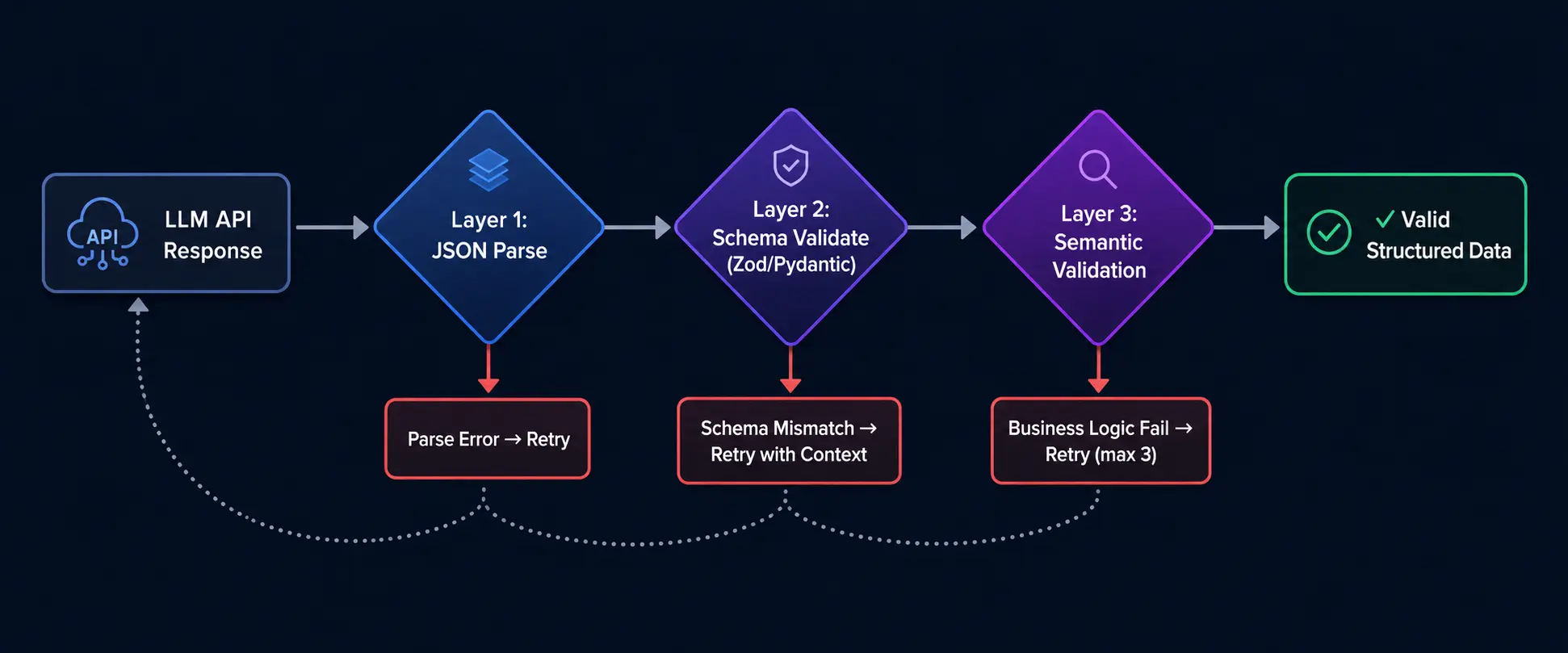
My Production Workflow: What I Actually Do
After building six different LLM extraction pipelines over the past year, here's the approach I've settled on:
- Define the schema first using Pydantic (Python) or Zod (TypeScript). Never start with the prompt - start with what you need the output to look like.
- Use structured outputs by default. There's no reason not to in 2026. The performance overhead is negligible, and the reliability improvement is dramatic.
- Add semantic validation for business-critical fields. Structured outputs guarantee types and structure. They don't guarantee the model didn't hallucinate a vendor name or invent an invoice number. Validate values against known data where possible.
- Monitor
finish_reasonon every response. A truncated structured output can still be invalid (even if the model would have produced valid output with more tokens). Setmax_tokensgenerously for complex schemas. - Log failed extractions with full context. When validation fails, I log the original input, the raw model response, and the validation error. This data is invaluable for prompt iteration.
- Use Fix JSON for debugging. When something goes wrong and I need to understand what the model actually returned, I paste the raw response into the repair tool to see the cleaned-up version alongside the original.
- Keep a fallback path. For my invoice pipeline, if automated extraction fails after 3 retries, the document goes into a human review queue. It's better to have a 97% automation rate with a clean fallback than to push 100% automation with 3% silent failures.
For formatting and inspecting complex LLM JSON responses during development, I use the JSON formatter constantly - nested extraction results from GPT-4o are unreadable without proper indentation.
When Structured Outputs Aren't Enough
Structured outputs solve 95% of the problem. Here's what they don't solve - and what to do about it.
Semantic Hallucination
The model returns perfectly structured JSON with completely fabricated values. Your schema says vendor_name: string and the model returns "Acme Corp" for a document that clearly says "GlobalTech Solutions." The JSON is structurally perfect. The data is wrong.
Mitigation: Cross-reference extracted values against source documents where possible. For entity extraction, compare against a known entity database. For classification tasks, add a confidence field and route low-confidence results to human review.
Context Window Overload
When the input document is very large (close to the context window limit), the model prioritizes completing the output over accuracy. I've seen extraction quality degrade noticeably when the input + output together exceed 80% of the context window.
Mitigation: Chunk large documents and extract separately. For a 50-page contract, extract from each section independently rather than passing the entire document.
Schema Complexity vs. Output Quality
There's an inverse relationship between schema complexity and extraction quality that most documentation doesn't mention. A schema with 50 fields and 4 levels of nesting will produce worse results than two separate calls with 25 fields each.
Mitigation: Split complex extractions into multiple focused calls. My invoice pipeline makes two calls: one for header data (vendor, dates, totals) and one for line items. Both are more accurate than a single combined extraction.
The Constrained Decoding Quality Tax
This is the nuance most tutorials skip - and it bit me hard in production.
Structured outputs work via constrained decoding: at each token generation step, the model's probability distribution is masked so only tokens producing valid output (per your schema) can be selected. The model literally cannot generate an invalid token. Sounds perfect. But there's a cost.
When the model would have "naturally" generated a token sequence that doesn't fit the schema, constrained decoding forces it onto an alternative path. Research published in early 2026 (arXiv:2603.03305) documented that this masking can push the model toward "locally valid yet semantically incorrect trajectories." In other words, the JSON is always valid - but the values inside it can be worse than what you'd get without schema enforcement.
I noticed this concretely in my invoice pipeline. When I compared structured output extractions against the same prompts using plain JSON mode (with post-hoc validation), the structured output version had:
- ~2% more hallucinated field values (plausible-looking but incorrect vendor names)
- Slightly shorter free-text descriptions (the model "ran out of budget" filling constrained fields)
- Occasional enum selections that felt like the model was "forced to pick something" rather than expressing uncertainty
The effect is most pronounced when:
- The schema is highly constrained (many enums, strict numeric ranges) - fewer valid tokens available at each step
- The input is ambiguous - the model "wants" to express uncertainty but the schema requires a definitive value
- Fields compete for context - filling 20 required fields pulls attention from accuracy on any single one
Mitigation strategies I've adopted:
- Add an explicit "uncertain" or "unknown" option to enums. Instead of forcing
priority: "low" | "medium" | "high", addpriority: "low" | "medium" | "high" | "unknown". Let the model express uncertainty rather than hallucinating confidence. - Make non-critical fields nullable. If a field might not be extractable from the source, make it
Optional[str]rather thanstr. A null is better than a hallucinated value. - Benchmark with and without schema constraints. For critical pipelines, run 100 test cases both ways and compare semantic accuracy - not just structural validity. You might find that JSON mode + Zod validation gives you better data quality than strict structured outputs for certain tasks.
- Use a two-pass approach for complex extractions. First pass: structured output for well-defined fields (dates, amounts, IDs). Second pass: less constrained extraction for free-text fields (descriptions, summaries) where the model's natural language ability matters more.
This isn't a reason to avoid structured outputs - they're still the right default. But treating them as a magic bullet without understanding the quality tradeoff will lead to subtle data quality issues that are much harder to debug than parse failures.
Legacy Systems Without Structured Output Support
If you're using a model (local, fine-tuned, or older API versions) that doesn't support structured outputs, you'll need a robust parsing layer. Here's the defensive parser I use:
import json
import re

def parse_llm_json(raw_response: str) -> dict | None:
    """Attempt to extract valid JSON from an LLM response, handling common failure modes."""

    # Try direct parse first (fastest path)
    try:
        return json.loads(raw_response)
    except json.JSONDecodeError:
        pass

    # Strip markdown code fences
    fenced = re.search(r'```(?:json)?\s*\n?([\s\S]*?)\n?```', raw_response)
    if fenced:
        try:
            return json.loads(fenced.group(1))
        except json.JSONDecodeError:
            pass

    # Extract first JSON object (handles preamble/postamble)
    obj_match = re.search(r'\{[\s\S]*\}', raw_response)
    if obj_match:
        try:
            return json.loads(obj_match.group(0))
        except json.JSONDecodeError:
            pass

    # Extract first JSON array
    arr_match = re.search(r'\[[\s\S]*\]', raw_response)
    if arr_match:
        try:
            return json.loads(arr_match.group(0))
        except json.JSONDecodeError:
            pass

    # All parsing attempts failed - use a repair tool
    # Our Fix JSON tool handles these cases: https://www.onlinejsonformatt.org/en/fix-json
    return None
For anything this parser can't handle, I reach for AI-powered JSON repair - it handles truncated objects, mixed quoting, trailing commas, and other corruption patterns that regex alone can't fix.
Cost and Performance Considerations
Structured outputs aren't free. Here's what I've measured across my production pipelines:
Token Overhead
Structured outputs add schema tokens to the request. A moderately complex schema (15-20 fields) adds 200-400 tokens to the input. At GPT-4o pricing ($2.50/1M input tokens, $10.00/1M output tokens as of July 2026), the schema overhead is approximately $0.001 per 1,000 requests on the input side. The output cost is where the real spend is - a typical structured extraction response of 200-500 tokens costs $0.002–$0.005 per request. Still negligible compared to the cost of failed extractions and retries, but worth tracking at scale.
Latency Impact
Constrained decoding adds a small latency overhead - typically 50-150ms per response in my measurements. For real-time applications, this matters. For batch processing (my primary use case), it's invisible.
A Note on Streaming
If you're building user-facing applications and want to stream responses for perceived speed, be aware that streaming and structured outputs have a friction point: you receive JSON tokens incrementally, but you can't parse incomplete JSON. You're left with two options:
- Buffer until complete - collect all streamed chunks, parse the full response at the end. You get the streaming UX for text responses elsewhere in your app, but structured extraction still blocks until done.
- Partial parsing with libraries - tools like
partial-json(npm) orijson(Python) can extract values from incomplete JSON streams. This works for top-level flat schemas but breaks on deeply nested structures where the closing braces haven't arrived yet.
In practice, I don't stream structured output calls. They're typically backend extraction tasks where the user isn't watching a cursor blink. If you need streaming and structure, consider generating a natural language response (streamed for UX) followed by a separate non-streamed structured extraction call.
The Real Cost: Retries
Without structured outputs, my invoice pipeline had a 6% failure rate requiring retries. Each retry costs the full token cost again. With structured outputs, the structural failure rate dropped to effectively 0%, eliminating retry costs entirely. The net effect: structured outputs reduced my total API spend by approximately 8% despite the schema token overhead.
| Approach | Failure Rate | Avg Retries | Effective Cost per 1K Requests |
|---|---|---|---|
| Naive prompting | 20% | 0.25 | ~$3.12 (1.25x base) |
| JSON mode | 5% (structural) | 0.06 | ~$2.65 (1.06x base) |
| Structured outputs | <0.1% (structural) | ~0 | ~$2.52 (1.01x base + schema) |
Base cost assumes a typical extraction request: ~800 input tokens + ~300 output tokens on GPT-4o ($2.50/1M in, $10/1M out). Your actual per-request cost depends on prompt length and output complexity.
The math is clear: structured outputs are cheaper in practice because they eliminate retries.
Putting It All Together
A year ago, I was writing regex extractors and retry loops to coax valid JSON out of GPT-3.5. Today, I define a Pydantic model, pass it to a structured output call, and get guaranteed schema compliance on the first attempt. The tooling has caught up to the need.
If you take one thing from this article: stop asking for JSON in your prompts and start requiring it at the API level. The progression is clear naive prompting is a prototype, JSON mode is acceptable for non-critical paths, and structured outputs are the production standard in 2026.
For the inevitable edge cases where things still break truncated responses from token limits, legacy models without structured output support, or debugging what went wrong in a failed extraction our JSON repair tool handles the cleanup so you can focus on the pipeline logic rather than string manipulation.
The LLM ecosystem moves fast. The specific API parameters will evolve. But the principle won't change: define your contract as a schema, enforce it at the infrastructure level, validate semantics in your application layer, and always have a fallback. That's a production system.